Browse Search Popular Register Upload Rules User list Login:
Search:
Complex Shape Changing

Image:
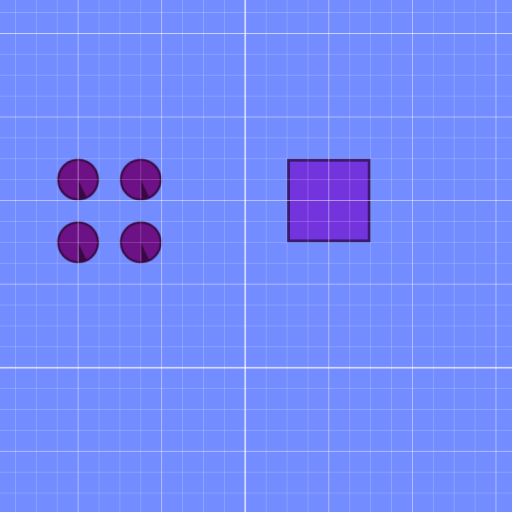
screenshot of the scene

Author: Versieon

Group: Default

Filesize: 19.51 kB

Date added: 2010-02-11

Rating: 7.1

Downloads: 713

Views: 976

Comments: 10

Ratings: 6

Times favored: 1

Made with: Algodoo before v1.8.5

Tags:

Scene tag

Hit the square with one of the balls, divides shape into 4 hinged parts,

Only works with squares.
Please log in to rate this scene
edit
Similar scenes
Title: TORUS in 2D ??
Rating: 5
Filesize: 114.03 kB
Downloads: 323
Comments: 1
Ratings: 1
Date added: 2017/08/14 11:20:08
Made with: Algodoo v2.1.0
Rating: rated 5
download
Title: Etch a Sketch(Real and Complex)
Rating: 5.4444
Filesize: 113.42 kB
Downloads: 966
Comments: 2
Ratings: 3
Date added: 2016/04/24 12:52:49
Made with: Algodoo v2.1.0
Rating: rated 5.4
download
Title: Shape Sorter. Contest-entry
Rating: 6.25
Filesize: 71.01 kB
Downloads: 88
Comments: 3
Ratings: 4
Date added: 2009/01/07 22:47:55
Made with: Phun
no image found for this scene
Rating: rated 6.3
download
Title: Long jump
Rating: 5
Filesize: 81.31 kB
Downloads: 1212
Comments: 0
Ratings: 1
Date added: 2024/11/02 23:15:43
Made with: Algodoo v2.1.1
Rating: rated 5
download
Title: Pseudo water
Rating: 5.625
Filesize: 46.26 kB
Downloads: 696
Comments: 10
Ratings: 2
Date added: 2010/05/30 09:36:17
Made with: Algodoo before v1.8.5
Rating: rated 5.6
download
Title: complex machinery that transports marbles
Rating: 5
Filesize: 17.76 kB
Downloads: 253
Comments: 0
Ratings: 1
Date added: 2025/08/01 18:14:33
Made with: Algodoo v2.2.4
Rating: rated 5
download
it crashed my phun... :(
(well, it apeared to work and then phun died)
Last edited at 2010/02/12 02:44:01 by sheepborg
Yea, it might not work in Phun, I didn't check.
it does work in algodoo , nice work
chain reaction: clone balls and put one square at the middle:tup:
This is really good.
I tried to make a spawner that generated a square with the same size as the sqaure that touched a laser, but it did not work.

Why? also, Help!
Thanks all!

legophunpp
You have to first find the size and position of the object using the new method,
Perfect show of the "New Method" function 10/10:tup: :lol:
where in the forums is the "new method"
New Method

Go Grady!!