
Mass Converter
9 posts • Page 1 of 1
Mass Converter
 by macunixgeek » Tue Sep 29, 2009 6:23 am
I was bored, and I wanted to make some kind of laser-based thing with Algodoo, so I started playing around, and this is what I came up with:
It reads the object's radius using the New Method and e.pos, and then uses simple math to compute the area and mass. It then creates other objects that are similar. THYME FTW!!!
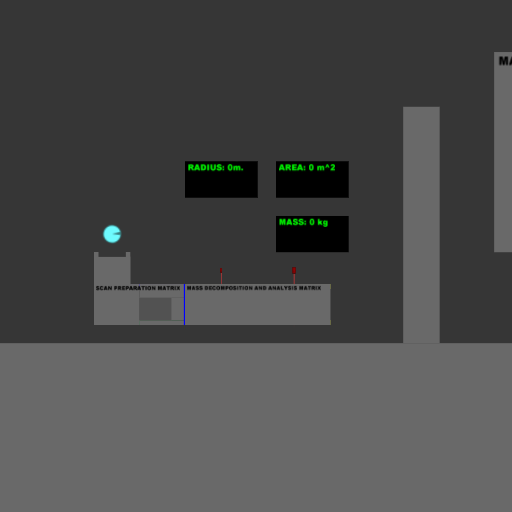


It reads the object's radius using the New Method and e.pos, and then uses simple math to compute the area and mass. It then creates other objects that are similar. THYME FTW!!!
Thymer
- macunixgeek
- Posts: 49
- Joined: Wed Sep 02, 2009 11:55 pm
Re: Mass Converter
by KarateBrot » Tue Sep 29, 2009 12:14 pm
it's interesting how you let the laser get the radius value. 

-

KarateBrot - Posts: 825
- Joined: Mon Aug 31, 2009 7:32 pm
- Location: Germany
Re: Mass Converter
by Sonic » Tue Sep 29, 2009 5:31 pm
Not a bad idea! Good job! Algodoo is useful for once.
I do stuff and break things. You know how it is.

-
Sonic - Posts: 1467
- Joined: Tue Sep 01, 2009 6:18 pm
- Location: America!!!
Re: Mass Converter
by Conundrumer » Thu Oct 01, 2009 4:18 am
Do you happen to know integral calculus?

-

Conundrumer - Posts: 344
- Joined: Mon Aug 31, 2009 5:55 pm
- Location: NYC
Re: Mass Converter
by Conundrumer » Thu Oct 01, 2009 5:19 am
macunixgeek wrote:No, why?
I have an idea on finding out the area of any object (eg irregular polygons), though I don't need to know integral calculus if I don't need to understand how this thing works.
-
Conundrumer - Posts: 344
- Joined: Mon Aug 31, 2009 5:55 pm
- Location: NYC
Re: Mass Converter
by macunixgeek » Thu Oct 01, 2009 6:09 am
I'd be interested to know what your idea is, even if I can't quite understand it.
Thymer
- macunixgeek
- Posts: 49
- Joined: Wed Sep 02, 2009 11:55 pm
Re: Mass Converter
by gradyfitz » Thu Oct 01, 2009 9:51 am
Conundrumer wrote:macunixgeek wrote:No, why?
I have an idea on finding out the area of any object (eg irregular polygons), though I don't need to know integral calculus if I don't need to understand how this thing works.
I'm pretty sure it just uses New Method, lasers (resets values, then at the next laser, grabs the e.pos then grabs the actual position and then calculates the difference as the radius, at the next area, it calculates the area (pi*radius*radius or πr²), though.... You could also do it differently, by just grabbing the radius instead of calculating it
 .
.I worked on this for a while (I accidentally got it to wrap around the wrong thing, but I fixed it
).- Code: Select all
Scene.my.For100In = (a, r, c)=>{
Scene.my.For10In(a,((r + 10) > (c + 10) ? {c + 10} : {c}),(c - (c % 10)));
((c + 10) < (r + 10)) ? {Scene.my.For10In(a,((r + 10) > (c + 10 + 10) ? {c + 20} : {c + 10}),(c + 10 - (c % 10)))} : {};
((c + 20) < (r + 10)) ? {Scene.my.For10In(a,((r + 10) > (c + 20 + 10) ? {c + 30} : {c + 20}),(c + 20 - (c % 10)))} : {};
((c + 30) < (r + 10)) ? {Scene.my.For10In(a,((r + 10) > (c + 30 + 10) ? {c + 40} : {c + 30}),(c + 30 - (c % 10)))} : {};
((c + 40) < (r + 10)) ? {Scene.my.For10In(a,((r + 10) > (c + 40 + 10) ? {c + 50} : {c + 40}),(c + 40 - (c % 10)))} : {};
((c + 50) < (r + 10)) ? {Scene.my.For10In(a,((r + 10) > (c + 50 + 10) ? {c + 60} : {c + 50}),(c + 50 - (c % 10)))} : {};
((c + 60) < (r + 10)) ? {Scene.my.For10In(a,((r + 10) > (c + 60 + 10) ? {c + 70} : {c + 60}),(c + 60 - (c % 10)))} : {};
((c + 70) < (r + 10)) ? {Scene.my.For10In(a,((r + 10) > (c + 70 + 10) ? {c + 80} : {c + 70}),(c + 70 - (c % 10)))} : {};
((c + 80) < (r + 10)) ? {Scene.my.For10In(a,((r + 10) > (c + 80 + 10) ? {c + 90} : {c + 80}),(c + 80 - (c % 10)))} : {};
((c + 90) < (r + 10)) ? {Scene.my.For10In(a,((r + 10) > (c + 90 + 10) ? {c + 100} : {c + 90}),(c + 90 - (c % 10)))} : {};
((c + 90) < (r + 10)) ? {Scene.my.For100In(a,r,(c + 100))} : {}};

Scene.my.For10In = (a, r, c)=>{
((c < r)) ? {a(c);} : {};
((c + 1) < r) ? {a(c + 1);} : {};
((c + 2) < r) ? {a(c + 2);} : {};
((c + 3) < r) ? {a(c + 3);} : {};
((c + 4) < r) ? {a(c + 4);} : {};
((c + 5) < r) ? {a(c + 5);} : {};
((c + 6) < r) ? {a(c + 6);} : {};
((c + 7) < r) ? {a(c + 7);} : {};
((c + 8) < r) ? {a(c + 8);} : {};
((c + 9) < r) ? {a(c + 9);} : {};
((c + 9) < r) ? {Scene.my.For10In (a,r,(c + 10))} : {}};

Scene.my.Pro02CheckSize = (name)=>{TEMParray := name ++ ["THISISTHEENDOFTHEARRAYHERE"];Found := false;Size := 0;Scene.my.For100In((x)=>{found ? {} : {((TEMParray(x)) + "") == "THISISTHEENDOFTHEARRAYHERE" ? {Found = true} : {};Size = x}},(50),0);(Size - 1)};

Scene.my.Area = (aoxy)=>{Scene.my.AreaIn(aoxy,0,0.0,Scene.my.Pro02CheckSize(aoxy))};
Scene.my.AreaIn = (aoxy,c,a,s)=>{c <= s ? {Scene.my.AreaIn(aoxy,(c + 1),(a + (aoxy(c)(0) * ((aoxy((c + 1) % (s + 1))(1)) - (aoxy(((c - 1) < 0 ? (s) : (c-1)))(1))))),s)} : {a/2.0}};
This calculates the area using the code:
- Code: Select all
Scene.my.Area([[4,3],[11,5],[8,12],[5,9],[6,5]])
This will calculate the area of the polygon with verticies at [4,3], [11,5], [8,12], [5,9] and [6,5].
- gradyfitz
- Posts: 174
- Joined: Tue Sep 01, 2009 8:33 am
- Location: Victoria, Australia
9 posts • Page 1 of 1
Who is online
Users browsing this forum: No registered users and 4 guests


