
[1.8.5] Bad Allocation
[1.8.5] Bad Allocation
 by jrderksen » Fri Apr 22, 2011 11:15 pm

-

jrderksen - Posts: 68
- Joined: Wed Dec 22, 2010 4:50 am
- Location: British Columbia, Canada
Re: Bad Allcollection
by zaroba » Fri Apr 22, 2011 11:49 pm
i'm thinking its pretty similar to the 'out of memory' errors as it seems to happen at about when i'd get one of those.
watching the memory usage in task manager, it seems that when backups stop getting made (for me at around 1.8gb), and some odd things start happening in a scene (like clicking to Fixate a piece will select the piece, or there will just be a black box shown when a hinge is selected) is when you'll get the Bad Allocation error when saving. believe this is normally when an Out of Memory error would happen.
but, i found you can just hit back to load the scene to how it was right before it went bad and you can save it then
-

zaroba - Posts: 2
- Joined: Sat Dec 04, 2010 9:45 pm
Re: Bad Allcollection
by jrderksen » Sat Apr 23, 2011 12:52 am
-
jrderksen - Posts: 68
- Joined: Wed Dec 22, 2010 4:50 am
- Location: British Columbia, Canada
Re: Bad Allcollection
by jrderksen » Sat Apr 23, 2011 1:02 am

-
jrderksen - Posts: 68
- Joined: Wed Dec 22, 2010 4:50 am
- Location: British Columbia, Canada
Re: Bad Allcollection
by Someone Else » Sat Apr 23, 2011 4:19 am
And having to upload to Algobox certainly seems like far too much of a hassle. Can you just rename the autosave file?
And is it "Bad Allcollection" or "Bad Allocation"?
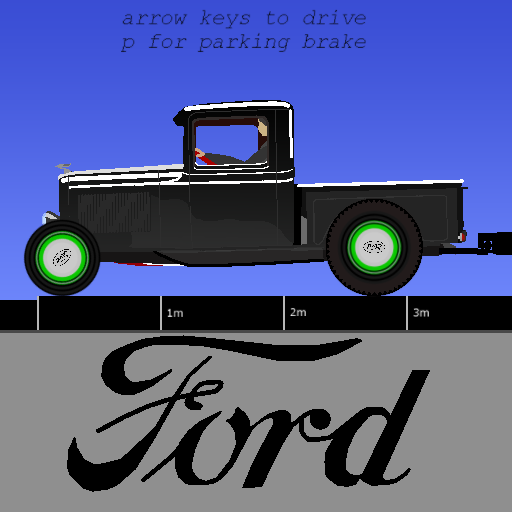
Could you send us a pic?
I love my brain...
TC42 wrote:Also, your sig is too big, please change it.
ARE YA HAPPY NOW?????
Thymechanic/Phundamentalist
Recently, I discovered something a lot of you probably already knew: Minecraft is awesome.
Due to this, I may not be as active as usual for a while.
-

Someone Else - Posts: 1147
- Joined: Sun Nov 21, 2010 10:53 pm
- Location: The Milky Way Galaxy
Re: Bad Allcollection
by jrderksen » Sat Apr 23, 2011 5:22 am


-
jrderksen - Posts: 68
- Joined: Wed Dec 22, 2010 4:50 am
- Location: British Columbia, Canada
Re: Bad Allcollection
by jrderksen » Wed May 25, 2011 6:40 am
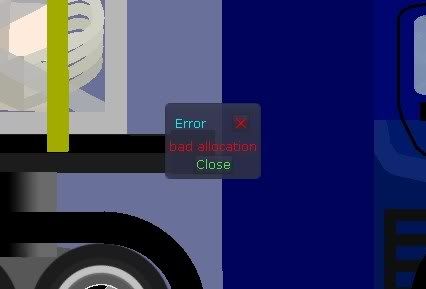
It is actually "Bad Allocation". Now I can't save the scene!!!
-
jrderksen - Posts: 68
- Joined: Wed Dec 22, 2010 4:50 am
- Location: British Columbia, Canada
Re: [1.8.5] Bad Allocation
by jrderksen » Wed May 25, 2011 7:15 am

-
jrderksen - Posts: 68
- Joined: Wed Dec 22, 2010 4:50 am
- Location: British Columbia, Canada
Re: [1.8.5] Bad Allocation
by Emanuel » Wed May 25, 2011 8:45 am
jrderksen wrote:Okay, by luck, I was able to save it. But what the heck is "Bad Allocation"
"Bad Allocation" is when memory can not be allocated, for some reason.
Is Algodoo using up all of your memory if you look in the task manager, as Someone Else mentioned?
/ Emanuel
- Emanuel
- Posts: 300
- Joined: Tue Feb 01, 2011 10:46 am
- Location: Umeå, Sweden
Re: [1.8.5] Bad Allocation
by Someone Else » Wed May 25, 2011 3:58 pm
It would seem to me that Bad Allocation would be caused either by a memory leak eating up all the available RAM, which should Autosave, show Out Of Memory Error, and close Algodoo; or by an event equivalent to somebody hacking Algodoo and causing it to fail that way.
I love my brain...
TC42 wrote:Also, your sig is too big, please change it.
ARE YA HAPPY NOW?????
Thymechanic/Phundamentalist
Recently, I discovered something a lot of you probably already knew: Minecraft is awesome.
Due to this, I may not be as active as usual for a while.
-
Someone Else - Posts: 1147
- Joined: Sun Nov 21, 2010 10:53 pm
- Location: The Milky Way Galaxy
Re: [1.8.5] Bad Allocation
by jrderksen » Wed May 25, 2011 5:07 pm
-
jrderksen - Posts: 68
- Joined: Wed Dec 22, 2010 4:50 am
- Location: British Columbia, Canada
Re: [1.8.5] Bad Allocation
by Someone Else » Wed May 25, 2011 6:41 pm
I love my brain...
TC42 wrote:Also, your sig is too big, please change it.
ARE YA HAPPY NOW?????
Thymechanic/Phundamentalist
Recently, I discovered something a lot of you probably already knew: Minecraft is awesome.
Due to this, I may not be as active as usual for a while.
-
Someone Else - Posts: 1147
- Joined: Sun Nov 21, 2010 10:53 pm
- Location: The Milky Way Galaxy
Re: [1.8.5] Bad Allocation
by Emanuel » Thu May 26, 2011 8:51 am
Someone Else wrote:I did not mention the Task Manager, that was zaroba. Also, if Algodoo was eating up all your memory, wouldn't it just give an Out Of Memory error?
It would seem to me that Bad Allocation would be caused either by a memory leak eating up all the available RAM, which should Autosave, show Out Of Memory Error, and close Algodoo; or by an event equivalent to somebody hacking Algodoo and causing it to fail that way.
Oh, sorry zaroba!
Someone Else wrote:So occasionally, Bad Allocation comes with Out Of Memory?
Yeah, this is correct. It depends on where Algodoo runs out of memory, but the end result is the same.
- Emanuel
- Posts: 300
- Joined: Tue Feb 01, 2011 10:46 am
- Location: Umeå, Sweden
Re: [1.8.5] Bad Allocation
by Someone Else » Thu May 26, 2011 2:59 pm
It also seems to me that if Algodoo knows it has run out of memory, couldn't it just onExitSave?
Hmm, that might be a problem with it saving with the sim running during testing.
Hmm... I would think it would be a lot more useful if it would undo the most recent SimStart.
Thyme could do that, if it instead repeatedly undos until sim.running = false.
- Code: Select all
scene.my.undoSimStart = ()=>{{sim.running == true} ? {app.undo; scene.my.undoSimStart} : {}}
I believe that this code is basically how a FOR loop works. Only, a FOR loop runs until one number equals another number, while this runs until the sim stops.
I love my brain...
TC42 wrote:Also, your sig is too big, please change it.
ARE YA HAPPY NOW?????
Thymechanic/Phundamentalist
Recently, I discovered something a lot of you probably already knew: Minecraft is awesome.
Due to this, I may not be as active as usual for a while.
-
Someone Else - Posts: 1147
- Joined: Sun Nov 21, 2010 10:53 pm
- Location: The Milky Way Galaxy
Re: [1.8.5] Bad Allocation
by Emanuel » Thu May 26, 2011 4:54 pm
Creating the phz-file requires quite a lot of memory if the scene is large.
- Emanuel
- Posts: 300
- Joined: Tue Feb 01, 2011 10:46 am
- Location: Umeå, Sweden
Re: [1.8.5] Bad Allocation
by Someone Else » Thu May 26, 2011 11:23 pm
- Code: Select all
scene.my.undoSimStart = ()=>{{sim.running} ? {app.undo; scene.my.undoSimStart} : {}}
Basically, whenever something happens while the sim is not running, Algodoo will approximate how much memory saving the current scene will take up. When the scene is running, Algodoo will not do any updates to this number, but instead how many actions must be undone until reaching the most recent sim start. That, of course, will be 0 if the sim is not running.
Algodoo will add these amounts together, and add a bit more just to be safe.
This sum will be subtracted from the amount of memory Algodoo allows itself to use.
Whenever Algodoo runs out of memory (that is, when the memory leaks fill up the entire RAM block up to the section Algodoo has partitioned off for itself), it will use the partition to run scene.my.undoSimStart and then close Algodoo, onExitSaving.
Algodoo will also open a dialog box asking whether you want to close Algodoo entirely or restart Algodoo.
When Algodoo opens back up, a dialog box will ask whether you want to open a new scene, onExitSave, or Autosave.
I love my brain...
TC42 wrote:Also, your sig is too big, please change it.
ARE YA HAPPY NOW?????
Thymechanic/Phundamentalist
Recently, I discovered something a lot of you probably already knew: Minecraft is awesome.
Due to this, I may not be as active as usual for a while.
-
Someone Else - Posts: 1147
- Joined: Sun Nov 21, 2010 10:53 pm
- Location: The Milky Way Galaxy
Re: [1.8.5] Bad Allocation
by Emanuel » Fri May 27, 2011 8:32 am
- Emanuel
- Posts: 300
- Joined: Tue Feb 01, 2011 10:46 am
- Location: Umeå, Sweden
Re: [1.8.5] Bad Allocation
by Someone Else » Fri May 27, 2011 6:36 pm
And onExitSaving upon running out of memory would only save a phn file, as opposed to a considerably larger (I think) phz file.
I love my brain...
TC42 wrote:Also, your sig is too big, please change it.
ARE YA HAPPY NOW?????
Thymechanic/Phundamentalist
Recently, I discovered something a lot of you probably already knew: Minecraft is awesome.
Due to this, I may not be as active as usual for a while.
-
Someone Else - Posts: 1147
- Joined: Sun Nov 21, 2010 10:53 pm
- Location: The Milky Way Galaxy
Re: [1.8.5] Bad Allocation
by jobro » Sun Sep 18, 2011 4:56 pm
- jobro
- Posts: 59
- Joined: Thu Oct 07, 2010 7:57 pm
Re: [1.8.5] Bad Allocation
by electronicboy » Sun Sep 18, 2011 6:56 pm
mainly;
Ram,
Cpu,
GPU
also, are your system drivers upto date OR at the recommended version for your graphics card?
also, please upload a copy of your logfile to somewhere (don't attach it to your post... txt files cant be uploaded!) and post a link to it

- electronicboy
- Posts: 1694
- Joined: Mon Aug 31, 2009 6:18 pm
Re: [1.8.5] Bad Allocation
by emilk » Mon Sep 19, 2011 5:35 pm
Someone Else wrote:So whether Bad Allocation or Out Of Memory shows up is entirely dependent on what part of Algodoo runs out of memory? Or rather, what part of Algodoo uses up the last bit of memory?
Yes, exactly.
If you fail to save as .phz, try saving as .phn - it is a bit less memory intensive. Also, decrease App.maxUndo (at least temporarily).
In the given scene Algodoo only takes up about 350 MB for me, even with all 40 undo levels maxed out. I fail to see why you should be running out of memory just by opening it.
Anyway, I will make sure that there is a more helpfull error message in the next version, as well as do some automatic memory cleaning, although that can only go so far.
- emilk
- Posts: 616
- Joined: Mon Aug 31, 2009 11:01 am
- Location: Umeå, Sweden
Re: [1.8.5] Bad Allocation
by jobro » Tue Sep 20, 2011 5:21 pm
I dont think my ram, cpu or GPU is any problem. Im gonna look it up but I got 2gb of ram and dual core processor. I can Photoshop without any problems... And yes, Algodoo ate 1gb of my memory.
I have homework and dont have much time, but you really want to make this because otherwise in the new version you make something nice and cant save it! That is very, very frustrating!
- jobro
- Posts: 59
- Joined: Thu Oct 07, 2010 7:57 pm
Re: [1.8.5] Bad Allocation
by electronicboy » Tue Sep 20, 2011 7:45 pm
secondly, 2 GB ram isnt much if you have alot in the background, AND algodoo is limited to taking up soo much...
and in my experience, that is caused by; Low ram or a low spec GPU....
yes, it may be able to run photoshop... but that dosnt say that it can run algodoo....
Both are totally different and have different rendering systems (AFAIK)
- electronicboy
- Posts: 1694
- Joined: Mon Aug 31, 2009 6:18 pm
Re: [1.8.5] Bad Allocation
by jobro » Fri Sep 23, 2011 5:29 pm
- jobro
- Posts: 59
- Joined: Thu Oct 07, 2010 7:57 pm
Re: [1.8.5] Bad Allocation
by electronicboy » Fri Sep 23, 2011 5:58 pm
It has better Memory management (mainly, the ability to clean up unneeded ram ).
If you still get this message, paste the log onto http://pastie.org/.
though, i dont think that the logfile will actually contain anything helpful...

- electronicboy
- Posts: 1694
- Joined: Mon Aug 31, 2009 6:18 pm
Who is online
Users browsing this forum: No registered users and 10 guests


