
Algodoo Phun Edition Saving Issues
Algodoo Phun Edition Saving Issues
 by jrderksen » Mon Apr 25, 2011 12:24 am
What do I do?
-

jrderksen - Posts: 68
- Joined: Wed Dec 22, 2010 4:50 am
- Location: British Columbia, Canada
Re: Algodoo Phun Edition Saving Issues
by electronicboy » Mon Apr 25, 2011 2:01 am
C:\Users\*username*\AppData\Local\VirtualStore\Program Files)\Algodoo Phun Edition\scenes
you will have to use the adressbar [in explorer] to get into appdata
ps, the searchbar is your friend
i found this off an older post [only a few week old aswell]
- electronicboy
- Posts: 1694
- Joined: Mon Aug 31, 2009 6:18 pm
Re: Algodoo Phun Edition Saving Issues
by Someone Else » Mon Apr 25, 2011 4:09 am
Algodoo saves scenes to My Documents/Algodoo.
With Phun, I think you can save a scene to a folder by way of, say, calling the file MyFolder/MyScene. I know this works in Algodoo, not sure about Phun.
I love my brain...
TC42 wrote:Also, your sig is too big, please change it.
ARE YA HAPPY NOW?????
Thymechanic/Phundamentalist
Recently, I discovered something a lot of you probably already knew: Minecraft is awesome.
Due to this, I may not be as active as usual for a while.
-

Someone Else - Posts: 1147
- Joined: Sun Nov 21, 2010 10:53 pm
- Location: The Milky Way Galaxy
Re: Algodoo Phun Edition Saving Issues
by Chronos » Mon Apr 25, 2011 4:34 am
TheWinkits wrote:They both looks of cuking amazing
-

Chronos - [Most Active Member 2010]
- Posts: 4457
- Joined: Mon Aug 31, 2009 6:00 pm
- Location: Californania
Re: Algodoo Phun Edition Saving Issues
by jrderksen » Mon Apr 25, 2011 9:08 am

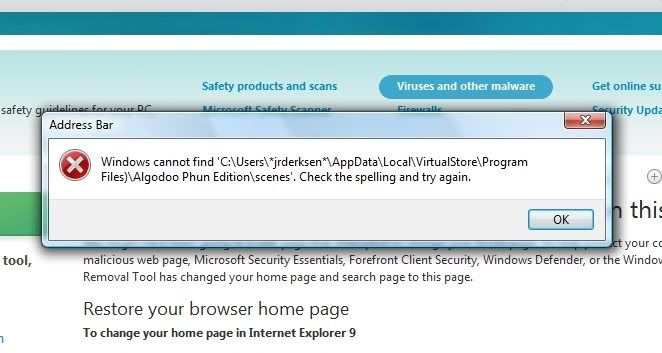
@electronicboy: When I search for C:\Users\*username*\AppData\Local\VirtualStore\Program Files)\Algodoo Phun Edition\scenes in the address-bar, a message comes up saying that Internet Explorer can't locate the link.
-
jrderksen - Posts: 68
- Joined: Wed Dec 22, 2010 4:50 am
- Location: British Columbia, Canada
Re: Algodoo Phun Edition Saving Issues
by RicH » Mon Apr 25, 2011 9:18 am
Second, The .zip version of Phun is basically Phun that doesn't require installing it. You just have to extract the .zip and off you go, which means you can put the Phun folder in your Desktop so it's easily accessible. It's kind of like a portable Phun.
Third, what version of Windows do you have? You don't type "C:\Users\*username*\AppData\Local\VirtualStore\Program Files)\Algodoo Phun Edition\scenes" that in exactly in the search bar, of course that doesn't exist. You replace *username* with your username. :\
Fourth, recall a title of a scene you made, for example "MYFIRSTSCENE.phz". Go open Search(you probably already know what that is, don't you?) and type the name in. After that, it's all common sense,
I hope you understood that rambling. If you don't, just ask more questions. They're free.

-

RicH - [Funniest Person 2010]
- Posts: 2043
- Joined: Tue Sep 01, 2009 9:01 am
Re: Algodoo Phun Edition Saving Issues
by jrderksen » Mon Apr 25, 2011 6:29 pm
-
jrderksen - Posts: 68
- Joined: Wed Dec 22, 2010 4:50 am
- Location: British Columbia, Canada
Re: Algodoo Phun Edition Saving Issues
by jrderksen » Mon Apr 25, 2011 6:37 pm
-
jrderksen - Posts: 68
- Joined: Wed Dec 22, 2010 4:50 am
- Location: British Columbia, Canada
Re: Algodoo Phun Edition Saving Issues
by RicH » Mon Apr 25, 2011 6:45 pm
If you have previously installed Phun with the Windows installer, the scenes you made with the installed version of Phun will not automatically transfer to the .zip version(if you think of using it). That is crazy talk.
-
RicH - [Funniest Person 2010]
- Posts: 2043
- Joined: Tue Sep 01, 2009 9:01 am
Re: Algodoo Phun Edition Saving Issues
by jrderksen » Mon Apr 25, 2011 7:14 pm
-
jrderksen - Posts: 68
- Joined: Wed Dec 22, 2010 4:50 am
- Location: British Columbia, Canada
Re: Algodoo Phun Edition Saving Issues
by RicH » Mon Apr 25, 2011 7:15 pm
Btw, asterisks do make a difference. It's an illegal character in filenames, folders etc.
-
RicH - [Funniest Person 2010]
- Posts: 2043
- Joined: Tue Sep 01, 2009 9:01 am
Re: Algodoo Phun Edition Saving Issues
by jrderksen » Mon Apr 25, 2011 7:26 pm
-
jrderksen - Posts: 68
- Joined: Wed Dec 22, 2010 4:50 am
- Location: British Columbia, Canada
Re: Algodoo Phun Edition Saving Issues
by RicH » Tue Apr 26, 2011 5:00 am
-
RicH - [Funniest Person 2010]
- Posts: 2043
- Joined: Tue Sep 01, 2009 9:01 am
Re: Algodoo Phun Edition Saving Issues
by jrderksen » Tue Apr 26, 2011 5:39 am
-
jrderksen - Posts: 68
- Joined: Wed Dec 22, 2010 4:50 am
- Location: British Columbia, Canada
Re: Algodoo Phun Edition Saving Issues
by jrderksen » Tue Apr 26, 2011 5:40 am
-
jrderksen - Posts: 68
- Joined: Wed Dec 22, 2010 4:50 am
- Location: British Columbia, Canada
Re: Algodoo Phun Edition Saving Issues
by RicH » Tue Apr 26, 2011 6:35 am
There are a lot of problems regarding Vista, and it's suggested that you use the .zip version for it as sometimes Vista doesn't allow write-access to Program Files, which means you can't save there. Just to be sure though, check if you have full access to Program files and look at the directory of Phun. Right click the Phun shortcut and click Open File Location, it should lead you to the Phun directory. Go look for your scenes there. If they aren't there, check if you can see all hidden files. They just might be hidden?
-
RicH - [Funniest Person 2010]
- Posts: 2043
- Joined: Tue Sep 01, 2009 9:01 am
Re: Algodoo Phun Edition Saving Issues
by jrderksen » Tue Apr 26, 2011 7:13 am

-
jrderksen - Posts: 68
- Joined: Wed Dec 22, 2010 4:50 am
- Location: British Columbia, Canada
Re: Algodoo Phun Edition Saving Issues
by RicH » Tue Apr 26, 2011 7:54 am
-
RicH - [Funniest Person 2010]
- Posts: 2043
- Joined: Tue Sep 01, 2009 9:01 am
Who is online
Users browsing this forum: No registered users and 2 guests


