
Grid fails to line up properly
8 posts • Page 1 of 1
Grid fails to line up properly
 by Someone Else » Tue Jan 25, 2011 4:15 am
I, in the Scenes forum topic wrote:ERRGH! Why won't Algodoo let me line this up with the grid?!?!? I can't make an accurate suspension without the grid. Hmm, I will report this in the Help/Bug Reports section. I can easily line it up so that the boxes are just left or just right of the gridline, but I can not line it up any more accurately than that. The Y-pos lines up well, but not the X-pos. It is always about half a grid square off. I tried scaling it up, and when it was eight times its normal size it would line up, but the fact that the antennae stick out farther than any of the boxes messed everything up.
Any suggestions?
Note- I posted the above in the Scenes forum topic.
This is the scene:
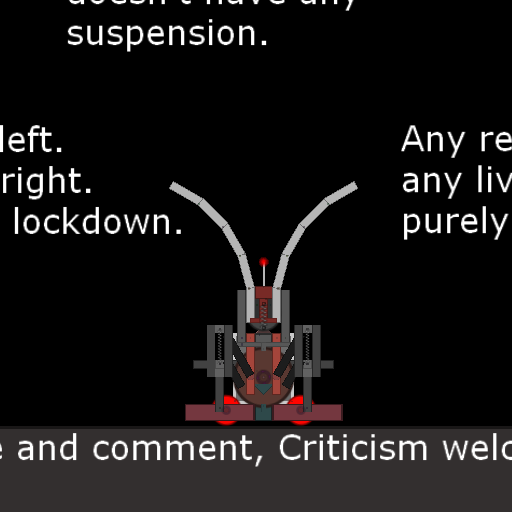


And this is the link to the topic.
This is not the first time I have had this problem. I also had it when I pasted my scripted machine gun into the Modular Spaceship thing.
Off-topic:
 Hmm, I could make a thruster out of that gun...
EDIT- I am running 1.8.0 on Windows XP.
Matthias Wandel is epic, in my humble opinion.
I love my brain...
ARE YA HAPPY NOW?????
Thymechanic/Phundamentalist
Recently, I discovered something a lot of you probably already knew: Minecraft is awesome.
Due to this, I may not be as active as usual for a while.
I love my brain...
TC42 wrote:Also, your sig is too big, please change it.
ARE YA HAPPY NOW?????
Thymechanic/Phundamentalist
Recently, I discovered something a lot of you probably already knew: Minecraft is awesome.
Due to this, I may not be as active as usual for a while.
-

Someone Else - Posts: 1147
- Joined: Sun Nov 21, 2010 10:53 pm
- Location: The Milky Way Galaxy
Re: Grid fails to line up properly
by TC42 » Tue Jan 25, 2011 4:48 am
Is this a scaling issue or an object creation issue?
And I'm still annoyed at you for ruining my signature for me...
And I'm still annoyed at you for ruining my signature for me...

Spambot wrote:Nowadays, memes usually are studied less in the field of biology, but more with the arena of psychology along with sociology. But, the major area of a meme, getting embraced and imitated all the time is what’s at any core connected with any meme.
-

TC42 - Posts: 984
- Joined: Sun Jan 09, 2011 1:53 pm
- Location: $ sudo apt get-install sandwich_
Re: Grid fails to line up properly
by Rrobba » Wed Jan 26, 2011 9:48 pm
Well, for starters you should download the latest version of Algodoo here. (Version 1.8.5)
If then doesn't work, reply.
If then doesn't work, reply.

I don't suffer from insanity. I enjoy every minute of it.
-

Rrobba - [Best Sig 2010]
- Posts: 1480
- Joined: Mon Aug 31, 2009 6:01 pm
- Location: Gibraltar
Re: Grid fails to line up properly
by Someone Else » Thu Jan 27, 2011 4:03 am
@TC42- The object is already there. It is the turtle-bot. I attempted to line it up with the grid, but the fact that the antennae stick out farther than the boxes I wanted to line up messed everything up.
And about the sig- I just had to.
@Robba- I will try 1.8.5. If I decide to keep using 1.8.5, will I need to get a new license, or will the one I used to unlock 1.8.0 still work? I suppose I will try it as I still have it hanging around, but if something goes horribly wrong, I will post again. Probably double-post in that case.
I will try it now.
EDIT BEFORE I POSTED THIS- I downloaded 1.8.5, it did not ask me for a license key, and I still cannot properly line up with the grid.
But, I am LOVING the GUI, so 1.8.5 is a keeper.
However, I don't much like the gear icons on some of the tools appear when the tool is selected, and I can't figure out how to turn it off. Also, I hit the camera button and the webcam came on, but I can't turn it off. Closing the webcam window did not turn the camera off. I suppose closing Algodoo might work, but ...
Will try it.
Worked. But the grid STILL fails.
And about the sig- I just had to.
@Robba- I will try 1.8.5. If I decide to keep using 1.8.5, will I need to get a new license, or will the one I used to unlock 1.8.0 still work? I suppose I will try it as I still have it hanging around, but if something goes horribly wrong, I will post again. Probably double-post in that case.
I will try it now.
EDIT BEFORE I POSTED THIS- I downloaded 1.8.5, it did not ask me for a license key, and I still cannot properly line up with the grid.
But, I am LOVING the GUI, so 1.8.5 is a keeper.
However, I don't much like the gear icons on some of the tools appear when the tool is selected, and I can't figure out how to turn it off. Also, I hit the camera button and the webcam came on, but I can't turn it off. Closing the webcam window did not turn the camera off. I suppose closing Algodoo might work, but ...
Will try it.
Worked. But the grid STILL fails.
Matthias Wandel is epic, in my humble opinion.
I love my brain...
ARE YA HAPPY NOW?????
Thymechanic/Phundamentalist
Recently, I discovered something a lot of you probably already knew: Minecraft is awesome.
Due to this, I may not be as active as usual for a while.
I love my brain...
TC42 wrote:Also, your sig is too big, please change it.
ARE YA HAPPY NOW?????
Thymechanic/Phundamentalist
Recently, I discovered something a lot of you probably already knew: Minecraft is awesome.
Due to this, I may not be as active as usual for a while.
-
Someone Else - Posts: 1147
- Joined: Sun Nov 21, 2010 10:53 pm
- Location: The Milky Way Galaxy
Re: Grid fails to line up properly
by Chronos » Thu Jan 27, 2011 4:11 am
Are you only selecting one object at a time? Selecting more than one causes the grid to align it in the middle of the objects.
TheWinkits wrote:They both looks of cuking amazing
-

Chronos - [Most Active Member 2010]
- Posts: 4457
- Joined: Mon Aug 31, 2009 6:00 pm
- Location: Californania
Re: Grid fails to line up properly
by Someone Else » Thu Jan 27, 2011 5:10 am
Hmm, I selected the whole thing with a box. Though, I don't see why this would happen. Come to think of it, I never looked at the other side of the turtle-bot.
Will try that.
EDIT- Yup, the almost whole thing seems to line up precisely just a bit to one side or the other. It is all to the same side- the left, in this case.
I clearly have "snap to grid" on, because it does snap to the grid- just in the wrong place.
As soon as I get this sorted out, I will add some suspension. Just so you know.
Will try that.
EDIT- Yup, the almost whole thing seems to line up precisely just a bit to one side or the other. It is all to the same side- the left, in this case.
I clearly have "snap to grid" on, because it does snap to the grid- just in the wrong place.
As soon as I get this sorted out, I will add some suspension. Just so you know.
Matthias Wandel is epic, in my humble opinion.
I love my brain...
ARE YA HAPPY NOW?????
Thymechanic/Phundamentalist
Recently, I discovered something a lot of you probably already knew: Minecraft is awesome.
Due to this, I may not be as active as usual for a while.
I love my brain...
TC42 wrote:Also, your sig is too big, please change it.
ARE YA HAPPY NOW?????
Thymechanic/Phundamentalist
Recently, I discovered something a lot of you probably already knew: Minecraft is awesome.
Due to this, I may not be as active as usual for a while.
-
Someone Else - Posts: 1147
- Joined: Sun Nov 21, 2010 10:53 pm
- Location: The Milky Way Galaxy
Re: Grid fails to line up properly
by Chronos » Thu Jan 27, 2011 11:17 am
But what I'm asking is, does it work when you only have one object selected?
TheWinkits wrote:They both looks of cuking amazing
-
Chronos - [Most Active Member 2010]
- Posts: 4457
- Joined: Mon Aug 31, 2009 6:00 pm
- Location: Californania
Re: Grid fails to line up properly
by Someone Else » Thu Jan 27, 2011 6:12 pm
I have never had problems when I had only one object selected. There have only ever been two instances of this grid fail- Ravenplucker's turtle-bot and when I put my Thyme cannon into the Modular Spaceship.
But really, it seems that if a lot of objects in an assembly are lined up to each other, it should let me snap all those objects to the grid.
Hmm, or it could be done with nudging, if only they would put that in.
But really, it seems that if a lot of objects in an assembly are lined up to each other, it should let me snap all those objects to the grid.
Hmm, or it could be done with nudging, if only they would put that in.Matthias Wandel is epic, in my humble opinion.
I love my brain...
ARE YA HAPPY NOW?????
Thymechanic/Phundamentalist
Recently, I discovered something a lot of you probably already knew: Minecraft is awesome.
Due to this, I may not be as active as usual for a while.
I love my brain...
TC42 wrote:Also, your sig is too big, please change it.
ARE YA HAPPY NOW?????
Thymechanic/Phundamentalist
Recently, I discovered something a lot of you probably already knew: Minecraft is awesome.
Due to this, I may not be as active as usual for a while.
-
Someone Else - Posts: 1147
- Joined: Sun Nov 21, 2010 10:53 pm
- Location: The Milky Way Galaxy
8 posts • Page 1 of 1
Who is online
Users browsing this forum: No registered users and 2 guests


