
InGame Menus (Help/How to)
2 posts • Page 1 of 1
InGame Menus (Help/How to)
 by Cs24 » Tue Nov 03, 2009 5:42 am
Could someone tell me how to make menus like the ones in these scenes?
(P.S. I'm not a noob in phun, just thyme, which I can assume is needed)
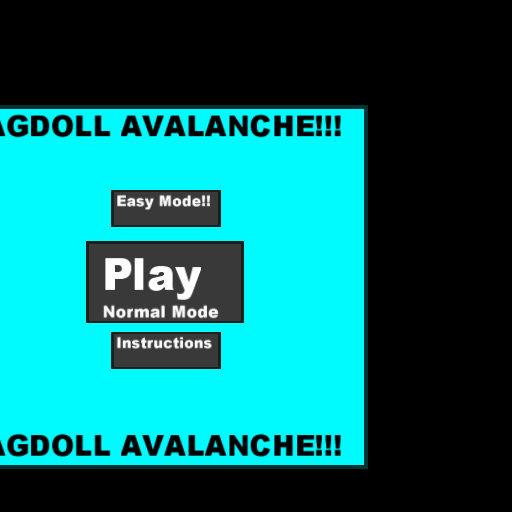


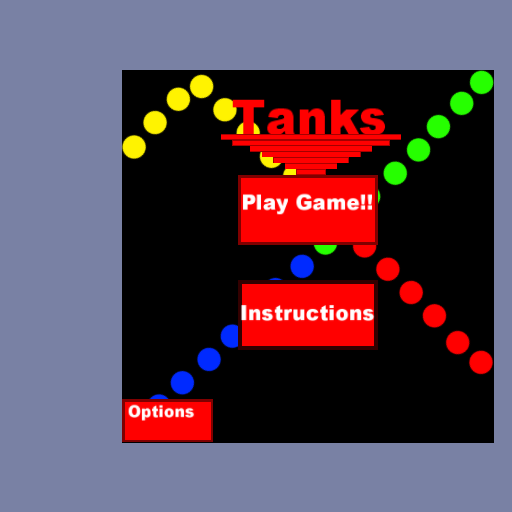

(P.S. I'm not a noob in phun, just thyme, which I can assume is needed)
Newbie Thymer
Intermediate Phuner
Intermediate Phuner
- Cs24
- Posts: 41
- Joined: Tue Nov 03, 2009 5:30 am
Re: InGame Menus (Help/How to)
by standardtoaster » Tue Nov 03, 2009 6:02 am
- Code: Select all
Scene.my.IsMouseInBox=(P1, P2, CIT, CIF) =>{App.mousePos(0) >= P1(0) && App.mousePos(1) <= P1(1) && App.mousePos(0) <= P2(0) && App.mousePos(1) >= P2(1) ? {CIT} : {CIF}}
This script will be able to tell if the mouse is in a box and adjust the color of it accordingly.
P1 stands for the first point you give it.
P2 stands for the second point you give it.
CIT stands for Color If True
CIF stands for Color If False
Ex. scene.my.IsMouseInBox([-1,1], [1,-1], [1,1,1,1], [0,0,0,1]) Put that into a box that is at [0,0] and has a size of 2x2. This will make it change to white if the mouse is in the box and make it change to black if the mouse is not in the box.
Put "Scene.my.IsMouseInBox(P1, P2, CIT, CIF)" Remove the quotation marks and make sure to replace the variables with values.

That takes care of the "mouseover." To make the screen "change" You would change the the screen by changing the camera pan. scene.camera.pan = x, y value
-
standardtoaster - Posts: 606
- Joined: Mon Aug 31, 2009 7:57 pm
2 posts • Page 1 of 1
Who is online
Users browsing this forum: No registered users and 4 guests


