
Why cant i get scripts tp work?
14 posts • Page 1 of 1
Why cant i get scripts tp work?
 by top_gear » Sat May 22, 2010 10:33 am
Having trouble trying to understand this program.
trialing this at the moment, intending to purchase, only if it can perform certain actions.
A detailed help file would be great, especially on thyme scripting.
using the thyme script samples posted, as a way to learn, nothing happens, so i must be missing an important known unknown when using scripts.
Do i need to create the whole scene from a script ( start to finish), or can i select objects in an existing scene and somehow change the position or angle using a script.
Wm2d allows for accurate positioning of its objects, simply by clicking on the object and entering height width angle x,y, co-ordinates, how do i perform this in algodoo ?
It also allows for a joint or hinge to work as is, or tick a box so its not always on, enter a script in a dialogue box, and the joint can lock unlock as stated in the script.
Is it possible to lock and unlock joints hinges when they reach a certain position or angle,
e.g. Imagine a wheel which has a pendulum atached (near the circumfrence) at the 3:00 position, the pendulum hinge is unlocked, working as normal,
wheel rotates clockwise, now at 6:00 the pendulum hinge is now locked.
now as the wheel rotaes the pedulum at 9:00, is now in a horizontal position due to the locked hinge, when hinge hits the 9:00 position, hinge unlocks allowing the pendulum to swing down, this repeats for each rotation on the motorised wheel.
so far all i can do is destroy a hinge using the laser, the pendulum falls off the wheel.
The placement of my objects are not accurate, only using the grid, becomes difficult when placing objects at different angles.
Have searched the site for easy to understand examples. e.g.
create a circle, click on it , enter the console, now type this code, "XXXXXXXXXX" which is to reposition the circle x amount of degrees,
enter this code, "XXXXXXXXX", this will reposition the centre of the circle 10cm higher,
now place a hinged lever on the wheel, click on the hinge , enter this sample code, this code will lock the hinge when wheel rotates to 180 degrees, and unlock at 270 degrees and repeat this for each rotation.
The above samples would be the basics when using algodoo, Which i cant find when searching.
is there a missing help file in the trial version which contains the imformation needed to get the thyme script samples to work ?
What is spawning ?, can not find the definition on this site.
thanks john.
trialing this at the moment, intending to purchase, only if it can perform certain actions.
A detailed help file would be great, especially on thyme scripting.
using the thyme script samples posted, as a way to learn, nothing happens, so i must be missing an important known unknown when using scripts.
Do i need to create the whole scene from a script ( start to finish), or can i select objects in an existing scene and somehow change the position or angle using a script.
Wm2d allows for accurate positioning of its objects, simply by clicking on the object and entering height width angle x,y, co-ordinates, how do i perform this in algodoo ?
It also allows for a joint or hinge to work as is, or tick a box so its not always on, enter a script in a dialogue box, and the joint can lock unlock as stated in the script.
Is it possible to lock and unlock joints hinges when they reach a certain position or angle,
e.g. Imagine a wheel which has a pendulum atached (near the circumfrence) at the 3:00 position, the pendulum hinge is unlocked, working as normal,
wheel rotates clockwise, now at 6:00 the pendulum hinge is now locked.
now as the wheel rotaes the pedulum at 9:00, is now in a horizontal position due to the locked hinge, when hinge hits the 9:00 position, hinge unlocks allowing the pendulum to swing down, this repeats for each rotation on the motorised wheel.
so far all i can do is destroy a hinge using the laser, the pendulum falls off the wheel.
The placement of my objects are not accurate, only using the grid, becomes difficult when placing objects at different angles.
Have searched the site for easy to understand examples. e.g.
create a circle, click on it , enter the console, now type this code, "XXXXXXXXXX" which is to reposition the circle x amount of degrees,
enter this code, "XXXXXXXXX", this will reposition the centre of the circle 10cm higher,
now place a hinged lever on the wheel, click on the hinge , enter this sample code, this code will lock the hinge when wheel rotates to 180 degrees, and unlock at 270 degrees and repeat this for each rotation.
The above samples would be the basics when using algodoo, Which i cant find when searching.
is there a missing help file in the trial version which contains the imformation needed to get the thyme script samples to work ?
What is spawning ?, can not find the definition on this site.
thanks john.
- top_gear
- Posts: 7
- Joined: Sat May 22, 2010 7:56 am
Re: Why cant i get scripts tp work?
by Mystery » Sat May 22, 2010 1:33 pm
viewtopic.php?f=13&t=411
This is the officially unofficial tutorial on thyme.
Many users do have trouble understanding it, for the most part it is highly outdated.
Firstly Thyme is a non-essential component of Algodoo, you don't need to understand it to play Algodoo, very few people know how to use Thyme, most are on this forum.
First you need to enable Advanced mode, you'll find it in options.
Thyme can not Control the scene, merely manipulate it (Like the force, One more reason to suspect Emil to be a Jedi )
)
Before your Cannon ball in, mess around with oncollide that would be the easiest start, just try to understand the mechanics of Thyme.
This is the officially unofficial tutorial on thyme.
Many users do have trouble understanding it, for the most part it is highly outdated.
Firstly Thyme is a non-essential component of Algodoo, you don't need to understand it to play Algodoo, very few people know how to use Thyme, most are on this forum.
First you need to enable Advanced mode, you'll find it in options.
Thyme can not Control the scene, merely manipulate it (Like the force, One more reason to suspect Emil to be a Jedi
) Before your Cannon ball in, mess around with oncollide that would be the easiest start, just try to understand the mechanics of Thyme.
-

Mystery - Posts: 2802
- Joined: Thu Sep 03, 2009 1:16 pm
- Location: Southern Australia
Re: Why cant i get scripts to work?
by top_gear » Sat May 22, 2010 4:52 pm
Thanks for the reply, i thought there would be a simple way to position objects accurately as in wm2d.
I was trialing wm2d, too expensive.
I understand the basics of programming as i write AHK scripts using autohotkey to automate tedious repetitive tasks of other programs.
when learning i could copy and paste samples, when activating the script i could see what it did, so then modifying the script and checking what it did helped me teach myself.
I have tried samples from the Tutorial]Thyme Tutorial - With explanations at every step,
once in the console it changes a value or answer directly in the console when you hit enter, nothing happens in the scene.
a major section of the tutorial has not been mentioned in the thread, same situation in many programmer forums,
its as if you need to know programming before you can learn from the samples in the forums, you get the end but not the important middle section that makes you think, " oh now i understand as i can see the whole picture",
its like entering at the end of a conversation, and the other party expecting you to know all the full details of that conversation.
the examples dont seem to be relavant,
e.g.
Scene.my.NumberOfApplesNeeded = 3;
Scene.my.NumberOfApples = 0;
hows the above, relevant to say, changing the position of an object or literally any thing in the scene,
i could manually position objects,except that the projects im trying, need to be perfectly placed so its balanced, e.g. place 12 weights evenly around a wheel if 1 weight is slightly out the wheel is unbalanced so the sim would not be accurate.
I assumed that positioning of objects, angles and locking or unlocking hinges would be the basics of a tutorial.
would go a long way when creating projects.
not johnys apples which gives an answer in the console, it confuses a person trying to learn, due to the fact that your scratching your head asking how its relevant to using algodoo.
advanced programers would understand the example, as they would know how its relevant, They seem to forget that once, they too had to start from the basics.
a tutorial should include the whole procedure so you can actually learn, in the above example where is the missing part of the script that shows how its used, so then you can change some values to see how it affects the object in the scene.
Is there a editor/reader to actually see the scripting in a phz file , as this could help me understand the scripting.
Still dont know what spawning is, on example it join objects, another example is a wheel flying around with no obvious connection, where did members learn about spawning, when i cant even find the definition, is it just a made up catchy hip hop term for join.
thanks.
I was trialing wm2d, too expensive.
I understand the basics of programming as i write AHK scripts using autohotkey to automate tedious repetitive tasks of other programs.
when learning i could copy and paste samples, when activating the script i could see what it did, so then modifying the script and checking what it did helped me teach myself.
I have tried samples from the Tutorial]Thyme Tutorial - With explanations at every step,
once in the console it changes a value or answer directly in the console when you hit enter, nothing happens in the scene.
a major section of the tutorial has not been mentioned in the thread, same situation in many programmer forums,
its as if you need to know programming before you can learn from the samples in the forums, you get the end but not the important middle section that makes you think, " oh now i understand as i can see the whole picture",
its like entering at the end of a conversation, and the other party expecting you to know all the full details of that conversation.
the examples dont seem to be relavant,
e.g.
Scene.my.NumberOfApplesNeeded = 3;
Scene.my.NumberOfApples = 0;
hows the above, relevant to say, changing the position of an object or literally any thing in the scene,
i could manually position objects,except that the projects im trying, need to be perfectly placed so its balanced, e.g. place 12 weights evenly around a wheel if 1 weight is slightly out the wheel is unbalanced so the sim would not be accurate.
I assumed that positioning of objects, angles and locking or unlocking hinges would be the basics of a tutorial.
would go a long way when creating projects.
not johnys apples which gives an answer in the console, it confuses a person trying to learn, due to the fact that your scratching your head asking how its relevant to using algodoo.
advanced programers would understand the example, as they would know how its relevant, They seem to forget that once, they too had to start from the basics.
a tutorial should include the whole procedure so you can actually learn, in the above example where is the missing part of the script that shows how its used, so then you can change some values to see how it affects the object in the scene.
Is there a editor/reader to actually see the scripting in a phz file , as this could help me understand the scripting.
Still dont know what spawning is, on example it join objects, another example is a wheel flying around with no obvious connection, where did members learn about spawning, when i cant even find the definition, is it just a made up catchy hip hop term for join.
thanks.
- top_gear
- Posts: 7
- Joined: Sat May 22, 2010 7:56 am
Re: Why cant i get scripts tp work?
by Mystery » Sun May 23, 2010 2:10 am
Alright i'll fill you in on spawning. 
Scene.addcircle({pos := e.pos; Color := [0,0,0,1]; radius := 0.1})
Scene. is the directory.
Addcircle Is what you want to add (You can also have Addbox, Addlaser, addplane ETC)
The rest are the objects variables.
Pos is the position, Algodoo works on a grid ( [0.0, 0.0] ) Making that [0.0, 1.0] would make it spawns one meter above of center, making it [0.0, -1.0] would make it spawn one meter below of center. E.pos means at the position of collision, only works if you put that code into an oncollide box.
The full list of Object variables can be found here
viewtopic.php?f=13&t=83#p1038
What you need to understand is that's the format Algodoo saves in, that exact format
Spawning can be done in two ways, Pumping it into the console, or putting it into an oncollide box. (Onccollide will run the script as soon as the object with the script in it is touched by another object)
Most of the tutorial i gave you deals with variables. Only the predefined Variables (The one already in algodoo) will do anything, scene.my.variables (Home made one) Won't effect anything directly but you can program things to use them. More on that later.
To read the Phz file you need to take two steps (Although Phn reading (Reading and editing the save file) is highly outdated)Change the Phz file extension to zip, Extract contents, Change the Phn file extension to Txt. Open will notepad.
Scene.addcircle({pos := e.pos; Color := [0,0,0,1]; radius := 0.1})
Scene. is the directory.
Addcircle Is what you want to add (You can also have Addbox, Addlaser, addplane ETC)
The rest are the objects variables.
Pos is the position, Algodoo works on a grid ( [0.0, 0.0] ) Making that [0.0, 1.0] would make it spawns one meter above of center, making it [0.0, -1.0] would make it spawn one meter below of center. E.pos means at the position of collision, only works if you put that code into an oncollide box.
The full list of Object variables can be found here
viewtopic.php?f=13&t=83#p1038
What you need to understand is that's the format Algodoo saves in, that exact format
Spawning can be done in two ways, Pumping it into the console, or putting it into an oncollide box. (Onccollide will run the script as soon as the object with the script in it is touched by another object)
Most of the tutorial i gave you deals with variables. Only the predefined Variables (The one already in algodoo) will do anything, scene.my.variables (Home made one) Won't effect anything directly but you can program things to use them. More on that later.
To read the Phz file you need to take two steps (Although Phn reading (Reading and editing the save file) is highly outdated)Change the Phz file extension to zip, Extract contents, Change the Phn file extension to Txt. Open will notepad.
Last edited by Mystery on Sun May 23, 2010 8:55 am, edited 1 time in total.
-
Mystery - Posts: 2802
- Joined: Thu Sep 03, 2009 1:16 pm
- Location: Southern Australia
Re: Why cant i get scripts tp work?
by top_gear » Sun May 23, 2010 8:43 am
mystery, thanks for the reply,
its was probably the most helpful post i have read in the whole forum.
Thanks for the tip on reading a phz file. I can learn from these, same as i learned autohotkey AHK or EXCEL macro scripts.
So spawning is the way you create and place objects + form actions through using a script, so its basically, programing ?
Slowly getting the hang of it,
Is there a way to set all the collisions, to no collisionin/collisions in the options menu, so only need to select the objects i need to collide, which are usually only a few items,
after sorting collisions out on 1 created gadget, i make many copies, which then needed all the collisions to be adjusted, dont copies include the collision info.
sometimes the collision menu drives me nuts, i select the objects i dont want collididing, but still at times it throws a wobbly and flies apart, i set it so no objects collide, then just select 1 of these to collide e.g. gears and it has an epileptic fit, i eventually sort it out, without knowing what i actually did to sort it out.
is this a bug ?
I dont understand why algodoo is programed this way, if i sit 2 plates on top of each other in real life they dont start shaking and try to rip themselves apart, then sometimes fly up when in a stationary position.
I wish they did, perpetual motion would be much easier
thanks.
its was probably the most helpful post i have read in the whole forum.
Thanks for the tip on reading a phz file. I can learn from these, same as i learned autohotkey AHK or EXCEL macro scripts.
So spawning is the way you create and place objects + form actions through using a script, so its basically, programing ?
Slowly getting the hang of it,
Is there a way to set all the collisions, to no collisionin/collisions in the options menu, so only need to select the objects i need to collide, which are usually only a few items,
after sorting collisions out on 1 created gadget, i make many copies, which then needed all the collisions to be adjusted, dont copies include the collision info.
sometimes the collision menu drives me nuts, i select the objects i dont want collididing, but still at times it throws a wobbly and flies apart, i set it so no objects collide, then just select 1 of these to collide e.g. gears and it has an epileptic fit, i eventually sort it out, without knowing what i actually did to sort it out.
is this a bug ?
I dont understand why algodoo is programed this way, if i sit 2 plates on top of each other in real life they dont start shaking and try to rip themselves apart, then sometimes fly up when in a stationary position.
I wish they did, perpetual motion would be much easier
thanks.
- top_gear
- Posts: 7
- Joined: Sat May 22, 2010 7:56 am
Re: Why cant i get scripts tp work?
by Under Ground » Sun May 23, 2010 8:57 am
Algodoo is programmed almost perfectly. I dont know what y6ou are doing wrong. PM be a picture or something, And I will do all I can to help you

-

Under Ground - Posts: 820
- Joined: Mon Aug 31, 2009 6:52 pm
- Location: In A Cave, Somewhere On Mars.
Re: Why cant i get scripts tp work?
by Mystery » Sun May 23, 2010 9:09 am
Spawning is a very small aspect, but to fully grasp it you should get the hang of property editing.
I have a circle i want it to turn black when it gets hit by any other object.
In that circles Oncollide box i would pump in
If i wanted everything else it touched to turn black i would make it
Any of the predefined variables you see in the scripting menu you can edit oncollide
Collision set is something i really love, quite easy to get the hang of.
Collideset is the collision group variable.
A = 1
B = 2
C = 4
D = 8
E = 16
F = 32
G = 64
If you want something to collide with "A" and "B" You would add A + B And you would get 3
to make something collide with all
Collideset = 127
When making object its better to make them too big then too small, Algodoo runs at 100hz on default, meaning it updates 100 times per second, this may seem like a lot but its not well suited for small objects.
Another reason for the shakes might be one object is inside of the other, which isn't necessarily a bug.
I have a circle i want it to turn black when it gets hit by any other object.
In that circles Oncollide box i would pump in
- Code: Select all
(e)=>{e.this.color = [0.0, 0.0, 0.0, 1.0]}
If i wanted everything else it touched to turn black i would make it
- Code: Select all
(e)=>{e.other.color = [0.0, 0.0, 0.0, 1.0]}
Any of the predefined variables you see in the scripting menu you can edit oncollide
Collision set is something i really love, quite easy to get the hang of.
Collideset is the collision group variable.
A = 1
B = 2
C = 4
D = 8
E = 16
F = 32
G = 64
If you want something to collide with "A" and "B" You would add A + B And you would get 3
to make something collide with all
Collideset = 127
When making object its better to make them too big then too small, Algodoo runs at 100hz on default, meaning it updates 100 times per second, this may seem like a lot but its not well suited for small objects.
Another reason for the shakes might be one object is inside of the other, which isn't necessarily a bug.
-
Mystery - Posts: 2802
- Joined: Thu Sep 03, 2009 1:16 pm
- Location: Southern Australia
Re: Why cant i get scripts tp work?
by top_gear » Sun May 23, 2010 2:44 pm
slowly getting it,
had problems when trying to use on collide fixate in the script menu,
the test is simply a wheel on a hinge with a lever on a hinge that rotates and hits a object, when the lever hits the object all objects are fixed, and the wheel stops turning.
does it fixate the object to the background, i thought it would fixate to the wheel thus allowing the wheel to still turn
tried oncollide on a hinge, didnt work.
do i need a statement, so it recognises which objects should only be fixed ?
thanks
had problems when trying to use on collide fixate in the script menu,
the test is simply a wheel on a hinge with a lever on a hinge that rotates and hits a object, when the lever hits the object all objects are fixed, and the wheel stops turning.
does it fixate the object to the background, i thought it would fixate to the wheel thus allowing the wheel to still turn
tried oncollide on a hinge, didnt work.
do i need a statement, so it recognises which objects should only be fixed ?
thanks
- top_gear
- Posts: 7
- Joined: Sat May 22, 2010 7:56 am
Re: Why cant i get scripts tp work?
by top_gear » Sun May 23, 2010 3:03 pm
forgot to ask,
how/where do i enter collision set variables, first wouldnt i need to name the objects in the scene for reference,
can i draw a circle and name it, or do i need to Spawn a circle or object, naming it during the process.
how/where do i enter collision set variables, first wouldnt i need to name the objects in the scene for reference,
can i draw a circle and name it, or do i need to Spawn a circle or object, naming it during the process.
- top_gear
- Posts: 7
- Joined: Sat May 22, 2010 7:56 am
Re: Why cant i get scripts tp work?
by Mystery » Mon May 24, 2010 9:06 am
Oncollide Fixate is a tricky thing.
Fixates and hinges work by joining two objects with their geomID.
GeomID is something unique every object will have in your.
There are a few ways to retrieve the geomID either with Method X or manually reading it by selecting your object, Ctrl+C then paste it to a document.
You can either read up about it all here
viewtopic.php?f=14&t=795
Or you can just rip the code of my Universal sticky balls.
Mine uses Method X
Pessing the ~ button will open up the console. from there type in your variable i.e
If you've done it right Algodoo should give you a confirmation, if you you shall get an error.
[Note: ":=" means to create a variable "=" means to edit]
If you want to change an objects propertys using a variable, in the properties box put in somthing like
into say the density box.
Too easy.
Fixates and hinges work by joining two objects with their geomID.
GeomID is something unique every object will have in your.
There are a few ways to retrieve the geomID either with Method X or manually reading it by selecting your object, Ctrl+C then paste it to a document.
You can either read up about it all here
viewtopic.php?f=14&t=795
Or you can just rip the code of my Universal sticky balls.
Mine uses Method X
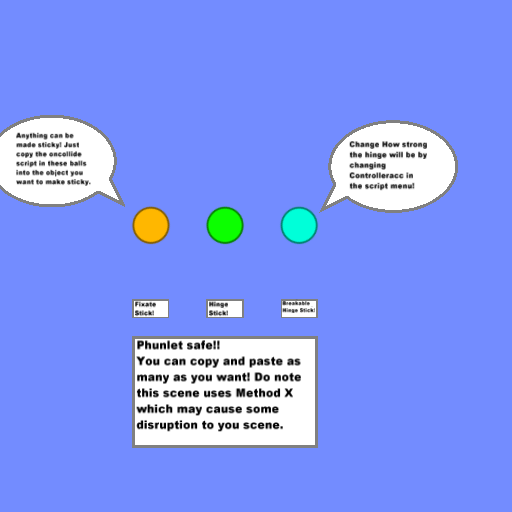


Pessing the ~ button will open up the console. from there type in your variable i.e
- Code: Select all
scene.my.var := 1
If you've done it right Algodoo should give you a confirmation, if you you shall get an error.
[Note: ":=" means to create a variable "=" means to edit]
If you want to change an objects propertys using a variable, in the properties box put in somthing like
- Code: Select all
{scene.my.var}
into say the density box.
Too easy.
-
Mystery - Posts: 2802
- Joined: Thu Sep 03, 2009 1:16 pm
- Location: Southern Australia
Re: Why cant i get scripts tp work?
by Dakta » Mon May 24, 2010 9:34 am
Hey Mystery well explained!
And welcome to the forums new guy! If you have any questions feel free to use the search function and if that doesn't work just ask the forum at large, someone should always have you an aswer pretty quick.
Here's what you need to know about Thyme.
Thyme is the scene format language of algodoo. It can control almost every aspect of a scene.
Phz files are renamed zip files that contain all the necessary scene data. At min they have a phn scene file, a thumbnail, and a md5checksums file to ensure integrity. They also contain the relative renamed paths to and copies of the texture images used in a scene.
If you want to manipulate the position and size of an object exactly today you have to either set them from the console when the object is created, or manually edit the phn file.
You also need to understand that Scene.addBox is a function that takes arguments. The scene files are simply large lists of functions that tell algodoo to create certain objects with certain properties. When you use scene.addbox from the console it is the same as writing it in the phn
if you want to edit the scene file directly from within algodoo you will have to support my suggestion for it in the suggestions forum and hope the developers implement it.
viewtopic.php?f=16&t=2086
We here have been requesting direct editing of these properties for some time without success. My apologies that the developers don't seem to have added them yet
And welcome to the forums new guy! If you have any questions feel free to use the search function and if that doesn't work just ask the forum at large, someone should always have you an aswer pretty quick.
Here's what you need to know about Thyme.
Thyme is the scene format language of algodoo. It can control almost every aspect of a scene.
Phz files are renamed zip files that contain all the necessary scene data. At min they have a phn scene file, a thumbnail, and a md5checksums file to ensure integrity. They also contain the relative renamed paths to and copies of the texture images used in a scene.
If you want to manipulate the position and size of an object exactly today you have to either set them from the console when the object is created, or manually edit the phn file.
You also need to understand that Scene.addBox is a function that takes arguments. The scene files are simply large lists of functions that tell algodoo to create certain objects with certain properties. When you use scene.addbox from the console it is the same as writing it in the phn
if you want to edit the scene file directly from within algodoo you will have to support my suggestion for it in the suggestions forum and hope the developers implement it.
viewtopic.php?f=16&t=2086
We here have been requesting direct editing of these properties for some time without success. My apologies that the developers don't seem to have added them yet
.. ,__,_____
. / __.==--" - - - - - - - - ""
./#(-'
.`-' From http://www.ascii-art.de/. Modded by me to work in Arial.
. / __.==--" - - - - - - - - ""
./#(-'
.`-' From http://www.ascii-art.de/. Modded by me to work in Arial.
a Mammoth wrote:be boring and interesting.
I didn't know you could go up 3.1.3! Thanks Mystery person!Mystery wrote:If you were jailbreaker you shouldn't have when't up the 3.1.3
-

Dakta - Posts: 417
- Joined: Sat Sep 12, 2009 4:36 pm
Re: Why cant i get scripts tp work?
by top_gear » Mon May 24, 2010 2:00 pm
Thanks dakta,
learning by modifying with the scripts,
i just select the objects from the scene window and copy and paste in notepad, no need to zip and unzip the file, so then i can modify the script in notepad, then copy and paste directly into the scene window, or via the console. i didnt know that this could be done!!
its great when trying to add objects from other scenes, have been trying to create friction wheels as gears, i read somewhere the normal type of gear is not accurate as it uses polygons ?
is there a way to stop e.g gears slipping out or just slightly breaking apart causing slippage, do i need to add depth to overcome this, noted a zdepth variable in a gearbox script, using cirle objects as gears, with friction set to +inf.
I assume this is what you mean when you stated "md5checksums file to ensure integrity" so there probably is too much force on the gear in my project, so it tries to pull apart on the hinge (am trying to keep the dimensions the same as the real life project i will build, so i guess its the depth dimension making the sim behave in an unusual way) , is there a way to cheat this.
thanks.
learning by modifying with the scripts,
i just select the objects from the scene window and copy and paste in notepad, no need to zip and unzip the file, so then i can modify the script in notepad, then copy and paste directly into the scene window, or via the console. i didnt know that this could be done!!
its great when trying to add objects from other scenes, have been trying to create friction wheels as gears, i read somewhere the normal type of gear is not accurate as it uses polygons ?
is there a way to stop e.g gears slipping out or just slightly breaking apart causing slippage, do i need to add depth to overcome this, noted a zdepth variable in a gearbox script, using cirle objects as gears, with friction set to +inf.
I assume this is what you mean when you stated "md5checksums file to ensure integrity" so there probably is too much force on the gear in my project, so it tries to pull apart on the hinge (am trying to keep the dimensions the same as the real life project i will build, so i guess its the depth dimension making the sim behave in an unusual way) , is there a way to cheat this.
thanks.
- top_gear
- Posts: 7
- Joined: Sat May 22, 2010 7:56 am
Re: Why cant i get scripts tp work?
by top_gear » Mon May 24, 2010 2:07 pm
mystery,
it would take quite a few cartons for me to rip something off your sticky balls,
too busy "coding" some coconuts!!
it would take quite a few cartons for me to rip something off your sticky balls,
too busy "coding" some coconuts!!
- top_gear
- Posts: 7
- Joined: Sat May 22, 2010 7:56 am
Re: Why cant i get scripts tp work?
by Mystery » Tue May 25, 2010 9:09 am
Zdepth doesn't effect the simulation in anyway, zdepth is simply the variable that decides if something would be in front if it or behind it.
I.E
Something with zdepth 2 would go in front of something with zdepth 1
There are a few tricks of the trade you can learn by reading tutorials
viewforum.php?f=14
A notable few
viewtopic.php?f=14&t=1019
viewtopic.php?f=14&t=221
viewtopic.php?f=14&t=795
I.E
Something with zdepth 2 would go in front of something with zdepth 1
There are a few tricks of the trade you can learn by reading tutorials
viewforum.php?f=14
A notable few
viewtopic.php?f=14&t=1019
viewtopic.php?f=14&t=221
viewtopic.php?f=14&t=795
-
Mystery - Posts: 2802
- Joined: Thu Sep 03, 2009 1:16 pm
- Location: Southern Australia
14 posts • Page 1 of 1
Who is online
Users browsing this forum: No registered users and 6 guests


