
Gradient Creator v.2
16 posts • Page 1 of 1
Gradient Creator v.2
 by standardtoaster » Sat Sep 19, 2009 6:27 am
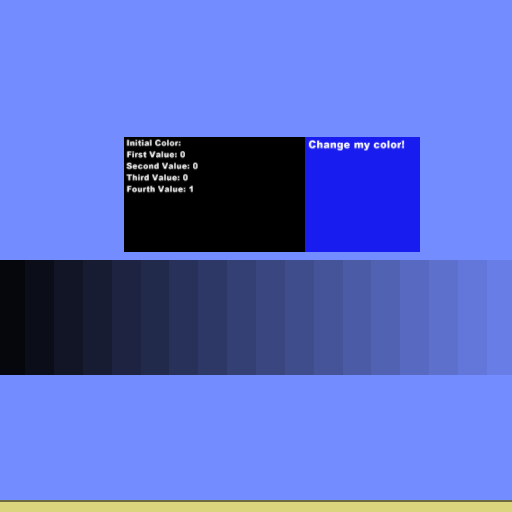


Adjust the color of the block to the right of the text box to change the Initial Color. Press enter to spawn the gradient.
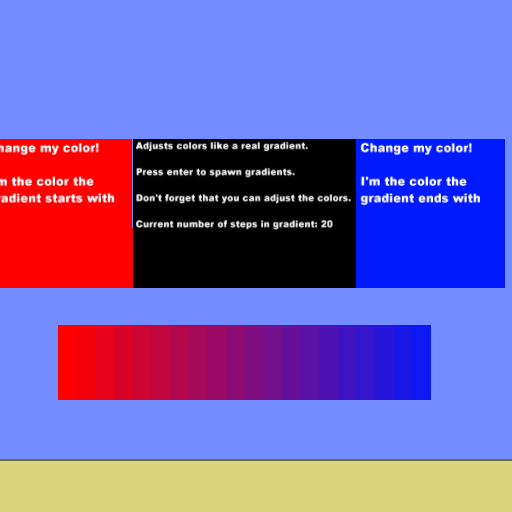

Adjusts color like a real gradient. Adjust the color of the box on the left to change the starting color. Adjust the color of the box on the right to change the ending color.
Press enter to spawn the gradient.
Last edited by standardtoaster on Wed Sep 23, 2009 3:18 am, edited 1 time in total.
-

standardtoaster - Posts: 606
- Joined: Mon Aug 31, 2009 7:57 pm




Re: Gradient Creator
by standardtoaster » Sun Sep 20, 2009 12:37 am
I have fixed a problem with this scene. The beacon on the "change me" block wasn't working. Please download the newest version of this scene.
-
standardtoaster - Posts: 606
- Joined: Mon Aug 31, 2009 7:57 pm
Re: Gradient Creator
by Laraso » Sun Sep 20, 2009 1:26 am
How did you get that download box!?!?!? 
Phundamentalist... When possible!

-

Laraso - Posts: 241
- Joined: Tue Sep 01, 2009 12:54 am
- Location: What are you, a stalker?
Re: Gradient Creator
by standardtoaster » Sun Sep 20, 2009 1:49 am
-
standardtoaster - Posts: 606
- Joined: Mon Aug 31, 2009 7:57 pm
Re: Gradient Creator
by cdh473 » Sun Sep 20, 2009 3:49 am
nice.
Please excuse my posts. I am extremely stupid.
-

cdh473 - Posts: 817
- Joined: Tue Sep 01, 2009 12:37 am
- Location: Yes
Re: Gradient Creator
by standardtoaster » Sun Sep 20, 2009 6:29 am
Can I please get some comments that are a bit more constructive? Such as suggestions or errors you get.
-
standardtoaster - Posts: 606
- Joined: Mon Aug 31, 2009 7:57 pm
Re: Gradient Creator
by Fujitsu » Sun Sep 20, 2009 7:12 am
It's great, and I haven't had any explosive errors with it, but I'm still bothered by the fact that the gradient of a 0.5 opacity shape has 9 completely transparent boxes at the end.
Other than that, it works great!
Other than that, it works great!

Gimmie money.
-

Fujitsu - Posts: 328
- Joined: Tue Sep 01, 2009 12:28 am
- Location: Canada
Re: Gradient Creator
by standardtoaster » Sun Sep 20, 2009 7:53 am
Fujitsu wrote:It's great, and I haven't had any explosive errors with it, but I'm still bothered by the fact that the gradient of a 0.5 opacity shape has 9 completely transparent boxes at the end.
Other than that, it works great!
I forgot to tell people that this gradient maker works best with fully opaque colors. I'll make sure to include that in future updates.
-
standardtoaster - Posts: 606
- Joined: Mon Aug 31, 2009 7:57 pm
Re: Gradient Creator
by Laraso » Sun Sep 20, 2009 3:32 pm
It works just fine, the only thing I am wondering is what I would use these gradients that it spawns for...
Phundamentalist... When possible!
-
Laraso - Posts: 241
- Joined: Tue Sep 01, 2009 12:54 am
- Location: What are you, a stalker?
Re: Gradient Creator
by cdh473 » Mon Sep 21, 2009 12:03 am
Laraso wrote:It works just fine, the only thing I am wondering is what I would use these gradients that it spawns for...
shading, decoration, etc.
Please excuse my posts. I am extremely stupid.
-
cdh473 - Posts: 817
- Joined: Tue Sep 01, 2009 12:37 am
- Location: Yes
Re: Gradient Creator v.2
by standardtoaster » Wed Sep 23, 2009 3:18 am
New version!!!
Adjusts color like a real gradient. Adjust the color of the box on the left to change the starting color. Adjust the color of the box on the right to change the ending color.
Press enter to spawn the gradient.
Adjusts color like a real gradient. Adjust the color of the box on the left to change the starting color. Adjust the color of the box on the right to change the ending color.
Press enter to spawn the gradient.
-
standardtoaster - Posts: 606
- Joined: Mon Aug 31, 2009 7:57 pm
Re: Gradient Creator v.2
by daniels220 » Wed Sep 23, 2009 3:49 am
Okay, now that is awesome. Arbitrary start/end colors, handles opacity correctly...really cool.
- daniels220
- Posts: 95
- Joined: Mon Aug 31, 2009 11:30 pm
Re: Gradient Creator v.2
by Laraso » Wed Sep 23, 2009 4:01 am
Great stuff man, keep up the good work!
Phundamentalist... When possible!
-
Laraso - Posts: 241
- Joined: Tue Sep 01, 2009 12:54 am
- Location: What are you, a stalker?
Re: Gradient Creator v.2
by standardtoaster » Wed Sep 23, 2009 6:46 pm
Thanks for the encouraging comments! I have updated the Gradient Creator yet again. I forgot to tell you guys that you can adjust the number of steps in the gradient. I have updated the scene with an easy way to do it. I guess that's what I get for uploading this late at night. 
I have updated the Gradient Creator yet again. I forgot to tell you guys that you can adjust the number of steps in the gradient. I have updated the scene with an easy way to do it. I guess that's what I get for uploading this late at night. -
standardtoaster - Posts: 606
- Joined: Mon Aug 31, 2009 7:57 pm
16 posts • Page 1 of 1
Who is online
Users browsing this forum: No registered users and 2 guests


