
My first use of thyme :)
My first use of thyme :)
 by Jaxc » Tue Dec 01, 2009 9:58 pm



-

Jaxc - Posts: 78
- Joined: Mon Aug 31, 2009 11:21 pm
Re: My first use of thyme :)
by kilebantick » Wed Dec 02, 2009 7:31 am

-

kilebantick - Posts: 1267
- Joined: Tue Sep 01, 2009 9:50 am
Re: My first use of thyme :)
by Jaxc » Wed Dec 02, 2009 10:59 pm
edit: your sure, it works for me when i download, just give it a few seconds to start
-
Jaxc - Posts: 78
- Joined: Mon Aug 31, 2009 11:21 pm
Re: My first use of thyme :)
by KarateBrot » Wed Dec 02, 2009 11:36 pm

-

KarateBrot - Posts: 825
- Joined: Mon Aug 31, 2009 7:32 pm
- Location: Germany
Re: My first use of thyme :)
by Cs24 » Thu Dec 03, 2009 7:09 am
2. scene.my.speed in your "speed changer" is always 1.1
"fixed"" version....
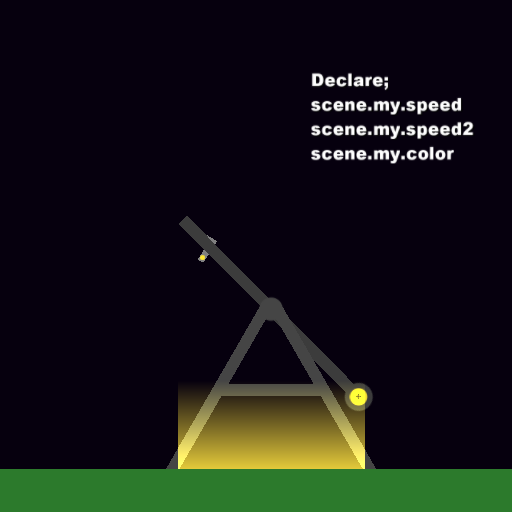
that was kinda fun playing around with scene.my.variable

Intermediate Phuner
- Cs24
- Posts: 41
- Joined: Tue Nov 03, 2009 5:30 am
Re: My first use of thyme :)
by kilebantick » Thu Dec 03, 2009 7:43 am

-
kilebantick - Posts: 1267
- Joined: Tue Sep 01, 2009 9:50 am
Re: My first use of thyme :)
by KarateBrot » Thu Dec 03, 2009 4:48 pm
-
KarateBrot - Posts: 825
- Joined: Mon Aug 31, 2009 7:32 pm
- Location: Germany
Re: My first use of thyme :)
by Cs24 » Thu Dec 03, 2009 10:05 pm
thanks guys
I'm not really new to phun, I've been using it since phun 4, only been posting a few months back and learned thyme very recently}
the rule of "no randomly generated colours" helps make scenes much nicer to look at (even to non-phun users)
and both of our topspins have a major flaw
anyone riding them would die from the Gs

Intermediate Phuner
- Cs24
- Posts: 41
- Joined: Tue Nov 03, 2009 5:30 am
Re: My first use of thyme :)
by Jaxc » Thu Dec 03, 2009 11:18 pm
Cs24 wrote:and both of our topspins have a major flaw
anyone riding them would die from the Gs
details, its once in a lifetime ride!
anyway, seems like i missed to do somthing that declairs the varibles, or am i wrong?
-
Jaxc - Posts: 78
- Joined: Mon Aug 31, 2009 11:21 pm
Re: My first use of thyme :)
by Cs24 » Thu Dec 03, 2009 11:24 pm
press "~" the button to the left of 1
then enter "scene.my.speed=0" without quotes and your scene will work
in my version scene.my.speed2 is for the motor that controls the chair
Intermediate Phuner
- Cs24
- Posts: 41
- Joined: Tue Nov 03, 2009 5:30 am
Re: My first use of thyme :)
by KarateBrot » Thu Dec 03, 2009 11:34 pm
you can do it with = too but sometimes the variables won't be declared. It happened to me twice so using := is bomb-proof for declaring variables in the console.
-
KarateBrot - Posts: 825
- Joined: Mon Aug 31, 2009 7:32 pm
- Location: Germany
Re: My first use of thyme :)
by Cs24 » Thu Dec 03, 2009 11:51 pm

I've used it before(when modding scenes for personal use) but had no idea what it really did

Intermediate Phuner
- Cs24
- Posts: 41
- Joined: Tue Nov 03, 2009 5:30 am
Re: My first use of thyme :)
by Jaxc » Fri Dec 04, 2009 11:03 am
Cs24 wrote:yes
press "~" the button to the left of 1
then enter "scene.my.speed=0" without quotes and your scene will work
thats what i have done, but it doesnt seem to work when uploaded :/
-
Jaxc - Posts: 78
- Joined: Mon Aug 31, 2009 11:21 pm
Re: My first use of thyme :)
by Jaxc » Fri Dec 04, 2009 12:09 pm
-
Jaxc - Posts: 78
- Joined: Mon Aug 31, 2009 11:21 pm
Re: My first use of thyme :)
by KarateBrot » Fri Dec 04, 2009 3:50 pm
Jaxc wrote:Cs24 wrote:yes
press "~" the button to the left of 1
then enter "scene.my.speed=0" without quotes and your scene will work
thats what i have done, but it doesnt seem to work when uploaded :/
that's the problem i was talking about. if you declare the variable type in scene.my.speed := 0 into the console and it will work
and there's another problem. your script in the rectangles are OnCollide scripts (which is good because you let objects collide with it so the code gets activated) but your scene.my.speed = ... thing is typed into OnHitByLaser. but you don't have any lasers that collide with the geometry so it's useless

rather than typing it into OnHitByLaser type it also into OnCollide so scene.my.speed = blahwhatever will also be activated at collision.
-
KarateBrot - Posts: 825
- Joined: Mon Aug 31, 2009 7:32 pm
- Location: Germany
Re: My first use of thyme :)
by Cs24 » Fri Dec 04, 2009 4:22 pm
so there are AFAIK 4 solutions to this
1. use :=
2. like my scenes get the user to enter the variables
3. don't use custom variables
would it be possible to enter a custom variable using onCollide? something like
(e)=>{scene.console.????=scene.my.variable}
of couse this doesn't work but would entering things into the console work with onCollide
Intermediate Phuner
- Cs24
- Posts: 41
- Joined: Tue Nov 03, 2009 5:30 am
Re: My first use of thyme :)
by KarateBrot » Fri Dec 04, 2009 4:35 pm
-
KarateBrot - Posts: 825
- Joined: Mon Aug 31, 2009 7:32 pm
- Location: Germany
Re: My first use of thyme :)
by Cs24 » Fri Dec 04, 2009 10:37 pm


I think this thread is done now
Intermediate Phuner
- Cs24
- Posts: 41
- Joined: Tue Nov 03, 2009 5:30 am
Re: My first use of thyme :)
by Jaxc » Sat Dec 05, 2009 5:52 pm
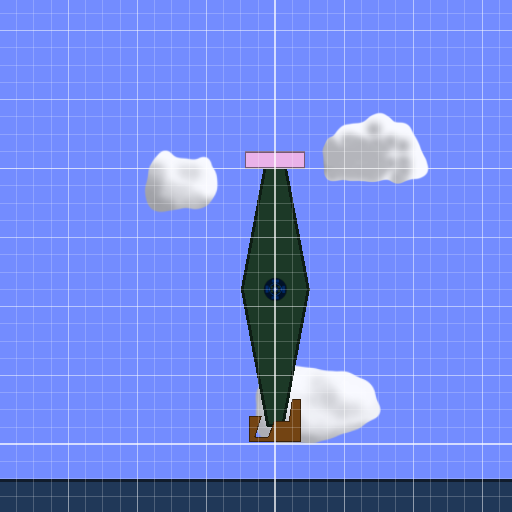
anyway, this ver SHOULD work:
-
Jaxc - Posts: 78
- Joined: Mon Aug 31, 2009 11:21 pm
Who is online
Users browsing this forum: No registered users and 10 guests


