
Linear Actuator
4 posts • Page 1 of 1
Linear Actuator
 by tjfitz » Wed Sep 29, 2010 10:02 am
Ok, I have searched the suggestions and it seems that this request has been shot down (quite cold in some cases) so I have 2 questions about the addition of a Piston/Cylinder/Actuator tool.
What is it about the request for a piston tool/object that gets such a bad following?
Is there a simple way to maybe control the Target Length of a spring by assigning keys to extend and retract (much like controlling forward and reverse with a motor) to maybe accomplish the same effect?
I am not to familiar yet with the scripting functions of Phun.
I have tried creating a piston in many fashions for use in solving a few concept ideas for model aircraft.. but it seems I need to continuiously re-invent the wheel to make it work right.. and by that time, I have lost much of the desire to work on the concept with which I originally started. and most times the piston becomes so complex, it slows down the interface like having a full screen of water..
And with hinge flexibility and sometimes materials skipping over eachother, it can get frustrating.. To quote the FAQ's, 'Algodoo is a digital toy' and IMHO a good one at that, I just think that for the many hobby builders and engineers out there who enjoy this product it would be a practical addition..
If not then maybe either a 'control' function for springs or maybe a 'Solidify' check block for joints and hinges so that they never move from their fixed positions.
Love this program.. it saved me $200 in materials on my last project..
What is it about the request for a piston tool/object that gets such a bad following?
Is there a simple way to maybe control the Target Length of a spring by assigning keys to extend and retract (much like controlling forward and reverse with a motor) to maybe accomplish the same effect?
I am not to familiar yet with the scripting functions of Phun.
I have tried creating a piston in many fashions for use in solving a few concept ideas for model aircraft.. but it seems I need to continuiously re-invent the wheel to make it work right.. and by that time, I have lost much of the desire to work on the concept with which I originally started. and most times the piston becomes so complex, it slows down the interface like having a full screen of water..
And with hinge flexibility and sometimes materials skipping over eachother, it can get frustrating.. To quote the FAQ's, 'Algodoo is a digital toy' and IMHO a good one at that, I just think that for the many hobby builders and engineers out there who enjoy this product it would be a practical addition..
If not then maybe either a 'control' function for springs or maybe a 'Solidify' check block for joints and hinges so that they never move from their fixed positions.
Love this program.. it saved me $200 in materials on my last project..
- tjfitz
- Posts: 1
- Joined: Wed Sep 29, 2010 8:31 am
Re: Linear Actuator
by Mystery » Wed Sep 29, 2010 12:29 pm
The request for pistons gets shot down quite coldly because most often it is an attempt to cheaply copy a rather lousy flash game incredibots. Secondly is because a pistons can be made, quite easily in fact.

There actually is a rather easy way of assigning lengths to springs although most of it involves scripting.
I'll give you the run down. (Assuming you have Phun)
Enable Advanced mode in options (This allows scripting)
Create a spring, in it's script menu note the current length.
Open up the console" ~ " type in Scene.my.spring1 = [Spring length] pretending the spring length was 1 meter you would type as follows
What you just did was create a variable.
Back to the spring in it script menu in length replace "1" with
So now the springs length will change to what ever scene.my.spring1 represents
if you change it to 2, the spring will change to 2 meters in length.
To change this length you can edit it via the console, which may not be very practical or you can use oncollide.
Every geom has an oncollide box so when ever the box makes contact with something else it will execute the oncollide script .
Some examples.
(e)=>{scene.my.spring1 = scene.my.spring1 + 1}
Every time the object is hit your spring will get one meter bigger
(e)=>{scene.my.spring1 = 2}
Every time the object is hit the spring will become 2 meters long
I have added an example scene as an attachment.
Pressing the up key will make the spring longer
Pressing the down key will make it shorter.
If you don't want spring to be so flexible make the objects attached by the spring denser this will make the hinge more stiff.
A way Phun was coded everything is kind of multiplied by the density.
Good luck
Remember if your ever stuck building somthing
1) search the forums
2) Search Algobox (I swear everything that could possibly be invented has already been invented*)
3)Create a thread acking for help.
There actually is a rather easy way of assigning lengths to springs although most of it involves scripting.
I'll give you the run down. (Assuming you have Phun)
Enable Advanced mode in options (This allows scripting)
Create a spring, in it's script menu note the current length.
Open up the console" ~ " type in Scene.my.spring1 = [Spring length] pretending the spring length was 1 meter you would type as follows
- Code: Select all
scene.my.spring1 = 1
What you just did was create a variable.
Back to the spring in it script menu in length replace "1" with
- Code: Select all
{scene.my.spring1}
So now the springs length will change to what ever scene.my.spring1 represents
if you change it to 2, the spring will change to 2 meters in length.
To change this length you can edit it via the console, which may not be very practical or you can use oncollide.
Every geom has an oncollide box so when ever the box makes contact with something else it will execute the oncollide script .
Some examples.
(e)=>{scene.my.spring1 = scene.my.spring1 + 1}
Every time the object is hit your spring will get one meter bigger
(e)=>{scene.my.spring1 = 2}
Every time the object is hit the spring will become 2 meters long
I have added an example scene as an attachment.
Pressing the up key will make the spring longer
Pressing the down key will make it shorter.
If you don't want spring to be so flexible make the objects attached by the spring denser this will make the hinge more stiff.
A way Phun was coded everything is kind of multiplied by the density.
Good luck
Remember if your ever stuck building somthing
1) search the forums
2) Search Algobox (I swear everything that could possibly be invented has already been invented*)
3)Create a thread acking for help.
- Attachments
-
 Spring Piston.phz
- (13.33 KiB) Downloaded 33 times
-

Mystery - Posts: 2802
- Joined: Thu Sep 03, 2009 1:16 pm
- Location: Southern Australia
Re: Linear Actuator
by Chronos » Wed Sep 29, 2010 12:36 pm
The reason piston suggestions have been shot down so many times is that they're really easy to make, especially with the grid.
As for making a controllable spring piston, you can make two blocks with another block between them and put a hinge on the middle block. Make the hinge controlled by whatever keys you want. Next, open the console (tilde key) and type:
scene.my.variablename = 1
It doesn't have to be variablename, it can be whatever.
On one of the blocks, go into the scripting menu (you need advanced mode on) and in the oncollide section, type:
scene.my.variablename = whatever you want the minimum distance of the spring to me (this might require some experimentation, so feel free to change it). Do the same thing on the other block, but instead, use the maximum distance.
Next, go to the scripting menu for the spring on your piston, and in the Length section, put:
{scene.my.variablename}
You need the braces, or it won't work. And there you have it, you made a controllable piston. However, this only allows you to go to two fixed numbers. If you want to be able to raise and lower it to whatever you want, it's a little more complicated. I'll make a scene as an example.
As you can see, there are two seperate mechanisms. They're the same except for two things:
1. The code
2. The motor key
The green boxes contain the script. It's either:
(e)=>{scene.my.spring = scene.my.spring + 0.05}
or
(e)=>{scene.my.spring = scene.my.spring - 0.05}
The mechanisms are just what I made to trigger the oncollide event. You can make one any way you want, as long as it hits the box multipul times (otherwise it'll only call the code once per key press). The spring's length is {scene.my.spring}. As you can see, when you push up, the spring length increases, but when you push down, it decreases.
So that's basically it. Hope I helped.
Man, that has to be the longest, most helpful thing I've ever written on this forum.
Oh, and DAMMIT MYSTERY, I SPENT AN HOUR WRITING THIS.
As for making a controllable spring piston, you can make two blocks with another block between them and put a hinge on the middle block. Make the hinge controlled by whatever keys you want. Next, open the console (tilde key) and type:
scene.my.variablename = 1
It doesn't have to be variablename, it can be whatever.
On one of the blocks, go into the scripting menu (you need advanced mode on) and in the oncollide section, type:
scene.my.variablename = whatever you want the minimum distance of the spring to me (this might require some experimentation, so feel free to change it). Do the same thing on the other block, but instead, use the maximum distance.
Next, go to the scripting menu for the spring on your piston, and in the Length section, put:
{scene.my.variablename}
You need the braces, or it won't work. And there you have it, you made a controllable piston. However, this only allows you to go to two fixed numbers. If you want to be able to raise and lower it to whatever you want, it's a little more complicated. I'll make a scene as an example.
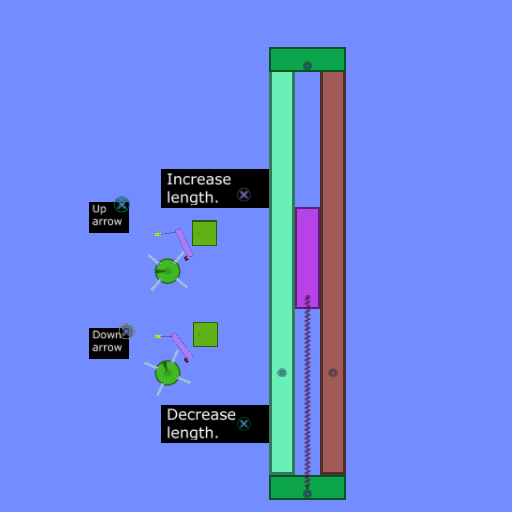


As you can see, there are two seperate mechanisms. They're the same except for two things:
1. The code
2. The motor key
The green boxes contain the script. It's either:
(e)=>{scene.my.spring = scene.my.spring + 0.05}
or
(e)=>{scene.my.spring = scene.my.spring - 0.05}
The mechanisms are just what I made to trigger the oncollide event. You can make one any way you want, as long as it hits the box multipul times (otherwise it'll only call the code once per key press). The spring's length is {scene.my.spring}. As you can see, when you push up, the spring length increases, but when you push down, it decreases.
So that's basically it. Hope I helped.
Man, that has to be the longest, most helpful thing I've ever written on this forum.
Oh, and DAMMIT MYSTERY, I SPENT AN HOUR WRITING THIS.
TheWinkits wrote:They both looks of cuking amazing
-

Chronos - [Most Active Member 2010]
- Posts: 4457
- Joined: Mon Aug 31, 2009 6:00 pm
- Location: Californania
Re: Linear Actuator
by Mystery » Wed Sep 29, 2010 1:38 pm
Chronos wrote:
Oh, and DAMMIT MYSTERY, I SPENT AN HOUR WRITING THIS.
I was afraid that would happen to me so i made mine "short".-
Mystery - Posts: 2802
- Joined: Thu Sep 03, 2009 1:16 pm
- Location: Southern Australia
4 posts • Page 1 of 1
Who is online
Users browsing this forum: No registered users and 11 guests


