
CSG add issue
15 posts • Page 1 of 1
CSG add issue
 by Rideg » Sat Dec 25, 2010 2:41 pm
Sometime when I try to merge to polygons into one they nothing happens when I hit add in the CSG-menu.

-

Rideg - Posts: 948
- Joined: Tue Dec 15, 2009 5:17 pm
- Location: Östersund, Sweden
Re: CSG add issue
by Chronos » Sat Dec 25, 2010 6:02 pm
I've been noticing this, too. Try doing it with only the two objects touching, nothing else.
TheWinkits wrote:They both looks of cuking amazing
-

Chronos - [Most Active Member 2010]
- Posts: 4457
- Joined: Mon Aug 31, 2009 6:00 pm
- Location: Californania
Re: CSG add issue
by Rideg » Sat Dec 25, 2010 6:03 pm
Chronos wrote:I've been noticing this, too. Try doing it with only the two objects touching, nothing else.
Sometimes it deosn't work even when I do as you said. Could it be some sort of Polygon surface limit?
-
Rideg - Posts: 948
- Joined: Tue Dec 15, 2009 5:17 pm
- Location: Östersund, Sweden
Re: CSG add issue
by Joel » Mon Dec 27, 2010 1:10 pm
Can you explain a little closer what behaviour you get, how you get it and what is expected? Because when I test it everything works.
Algodoo Developer
- Joel
- Posts: 104
- Joined: Mon Aug 31, 2009 11:03 am
Re: CSG add issue
by Rideg » Mon Dec 27, 2010 2:09 pm
I don't really know what's causing it. Sometimes, when I make polygons by CSG-add, this problem occours. Let's say I have a polyon shaped like a circle. When I make another polyon and place it ontop of the first polygon with some of it outside the first polygon and hit CSG-add, nothing happens. The step won't save in "undo" and the surfaces of the polygon is still the same.
I don't know how to have pictures in my post but I hope you got me.
-Johan
I don't know how to have pictures in my post but I hope you got me.
-Johan
-
Rideg - Posts: 948
- Joined: Tue Dec 15, 2009 5:17 pm
- Location: Östersund, Sweden
Re: CSG add issue
by Joel » Mon Dec 27, 2010 2:19 pm
Ok, so it doesn't happen with circles and boxes (those created by those tools, a circle and a polygon shaped like a circle aren't handled the same) but only polygons?
Algodoo Developer
- Joel
- Posts: 104
- Joined: Mon Aug 31, 2009 11:03 am
Re: CSG add issue
by Rideg » Mon Dec 27, 2010 2:37 pm
I do believe I have had this problem when trying to merge polygons + circle/box/polygon
-
Rideg - Posts: 948
- Joined: Tue Dec 15, 2009 5:17 pm
- Location: Östersund, Sweden
Re: CSG add issue
by Someone Else » Sat Jan 01, 2011 3:02 am
I have 1.8.0, and sometimes I cannot CSG-add one geom to another geom BENEATH the selected geom. However, it works when the selected geom is on the back. I cannot reproduce this problem now, but I know I had it in the past. It's weird. 
Let me know if that made no sense.
Let me know if that made no sense.
Matthias Wandel is epic, in my humble opinion.
I love my brain...
ARE YA HAPPY NOW?????
Thymechanic/Phundamentalist
Recently, I discovered something a lot of you probably already knew: Minecraft is awesome.
Due to this, I may not be as active as usual for a while.
I love my brain...
TC42 wrote:Also, your sig is too big, please change it.
ARE YA HAPPY NOW?????
Thymechanic/Phundamentalist
Recently, I discovered something a lot of you probably already knew: Minecraft is awesome.
Due to this, I may not be as active as usual for a while.
-

Someone Else - Posts: 1147
- Joined: Sun Nov 21, 2010 10:53 pm
- Location: The Milky Way Galaxy
Re: CSG add issue
by Chronos » Sat Jan 01, 2011 3:55 am
I don't think that's a problem. I'm pretty sure something has to be on the top to add it to another object.
TheWinkits wrote:They both looks of cuking amazing
-
Chronos - [Most Active Member 2010]
- Posts: 4457
- Joined: Mon Aug 31, 2009 6:00 pm
- Location: Californania
Re: CSG add issue
by Pyromaniac605 » Sat Jan 01, 2011 5:26 am
I've had the same issue, it's really getting on my nerves. 
- Pyromaniac605
- Posts: 10
- Joined: Sat Jan 01, 2011 2:38 am
Re: CSG add issue
by Someone Else » Mon Jan 03, 2011 6:08 am
I just CSG-added one geom to another geom in every way possible and it worked flawlessly every time. I also added one box simultaneously to two other boxes, repeated it with circles, and got the same results. However, I know I have had problems adding geoms on top in the past. However, I have a vague recollection of those instances being in fairly complex scenes. Perhaps the overall complexity of the scene has something to do with it.
I have also had problems with when I clone something and place it where it overlaps something else, the objects/assemblies auto-glue together. However, when the clone is placed where it overlaps only the background, then move it into place, it works fine.
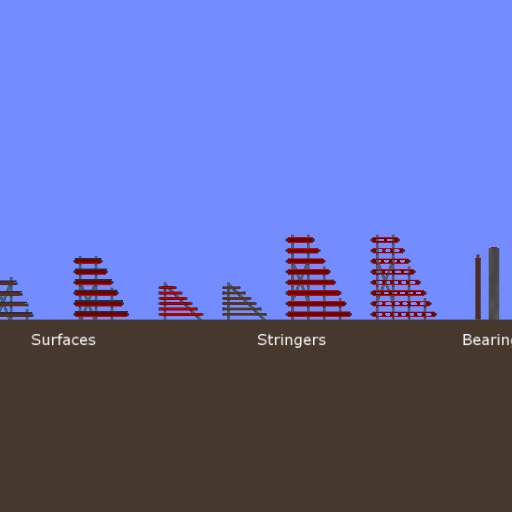
The most recent instance of this was with Kilinich's bridge building kit:
I have also had problems with when I clone something and place it where it overlaps something else, the objects/assemblies auto-glue together. However, when the clone is placed where it overlaps only the background, then move it into place, it works fine.
The most recent instance of this was with Kilinich's bridge building kit:


Matthias Wandel is epic, in my humble opinion.
I love my brain...
ARE YA HAPPY NOW?????
Thymechanic/Phundamentalist
Recently, I discovered something a lot of you probably already knew: Minecraft is awesome.
Due to this, I may not be as active as usual for a while.
I love my brain...
TC42 wrote:Also, your sig is too big, please change it.
ARE YA HAPPY NOW?????
Thymechanic/Phundamentalist
Recently, I discovered something a lot of you probably already knew: Minecraft is awesome.
Due to this, I may not be as active as usual for a while.
-
Someone Else - Posts: 1147
- Joined: Sun Nov 21, 2010 10:53 pm
- Location: The Milky Way Galaxy
Re: CSG add issue
by Pyromaniac605 » Sat Jan 15, 2011 11:08 am
I hope this gets fixed, its honestly started ruining Algodoo for me. 
- Pyromaniac605
- Posts: 10
- Joined: Sat Jan 01, 2011 2:38 am
Re: CSG add issue
by gradyfitz » Sun Jan 16, 2011 3:37 pm
Pyromaniac605 wrote:I hope this gets fixed, its honestly started ruining Algodoo for me.
Oh that's no good, try putting this code into the console (F11 or Tilde ("~")):
- Code: Select all
App.forceVertexPolygonDrawing = ! App.forceVertexPolygonDrawing
I rarely run into this problem with forced vertex polygon drawing on, but in my testing (in an attempt to replicate this using extremely complex geometries), toggling it typically fixes it (this is probably an issue of two overlapping surfaces simply not being found).
I think this rendering method is a bit more intensive, but I don't notice it, so leaving it on (putting it into the console once) may or may not be desirable (you can turn it off again using the same code).
Hopefully this helped with the problem, it's not a fix, but it should help work around the problem until the issue is discovered
 .
.- gradyfitz
- Posts: 174
- Joined: Tue Sep 01, 2009 8:33 am
- Location: Victoria, Australia
Re: CSG add issue
by Someone Else » Sun Jan 16, 2011 7:29 pm
Huh, now I can't reproduce it. But it certainly happened when I made that post.
That is, the auto-glue thing.
But what's getting on my nerves now is on some scenes, the grid will add another layer of smaller grids when the new squares are half the length of a fixate, whereas on some other scenes the length of a new square is about equal to the length of a fixate.
That is, some scenes allow me to have smaller grid squares than others. It's really getting on my nerves.
That is, the auto-glue thing.
But what's getting on my nerves now is on some scenes, the grid will add another layer of smaller grids when the new squares are half the length of a fixate, whereas on some other scenes the length of a new square is about equal to the length of a fixate.
That is, some scenes allow me to have smaller grid squares than others. It's really getting on my nerves.
Matthias Wandel is epic, in my humble opinion.
I love my brain...
ARE YA HAPPY NOW?????
Thymechanic/Phundamentalist
Recently, I discovered something a lot of you probably already knew: Minecraft is awesome.
Due to this, I may not be as active as usual for a while.
I love my brain...
TC42 wrote:Also, your sig is too big, please change it.
ARE YA HAPPY NOW?????
Thymechanic/Phundamentalist
Recently, I discovered something a lot of you probably already knew: Minecraft is awesome.
Due to this, I may not be as active as usual for a while.
-
Someone Else - Posts: 1147
- Joined: Sun Nov 21, 2010 10:53 pm
- Location: The Milky Way Galaxy
Re: CSG add issue
by EMKshadow » Sun Jan 23, 2011 10:38 pm
I also have experienced the csg not adding what's under the object although i havent encountered any auto-glue. The csg problem is completely random for me, i havent been able to find a similarity between any of the instances when it happens 
SO glad i read that, now i can make accurate polygons for engines, guns etc. thanks so much!
EDIT: damn its only visual...
gradyfitz wrote:Oh that's no good, try putting this code into the console (F11 or Tilde ("~")):
- Code: Select all
App.forceVertexPolygonDrawing = ! App.forceVertexPolygonDrawing
SO glad i read that, now i can make accurate polygons for engines, guns etc. thanks so much!
EDIT: damn its only visual...
-

EMKshadow - Posts: 29
- Joined: Tue Aug 10, 2010 1:47 am
15 posts • Page 1 of 1
Who is online
Users browsing this forum: No registered users and 4 guests


